Web accessibility is no longer optional, it’s essential. In 2023 alone, website accessibility lawsuits surged, with individuals increasingly taking legal action against sites that fail to accommodate users with disabilities.
Beyond avoiding lawsuits, making your site accessible is the right thing to do and opens your content to a wider audience. Approximately 1 in 4 adults in the U.S. lives with some form of disability, so ensuring they can use your website benefits everyone. If you’re a website owner, developer, or digital agency looking for an easy way to improve accessibility compliance without deep technical expertise, this review is for you.
Enter All-in-One Accessibility® by Skynet Technologies, an AI-powered website accessibility solution designed to bring your site up to standard fast. In this comprehensive review, we’ll explore what All-in-One Accessibility offers, its key features, pros and cons, how it compares to other tools, and whether it truly lives up to its promise of (almost) one-click ADA and WCAG compliance.
What is All-in-One Accessibility By Skynet Technologies?
All-in-One Accessibility is a software-as-a-service (SaaS) accessibility widget that you can install on any website to instantly provide a suite of accessibility features for your visitors. Developed by Skynet Technologies (an ISO 9001 and 27001 certified company and member of the W3C and IAAP), this tool uses artificial intelligence to help identify and remediate accessibility issues.
Once added to your site, it presents a floating accessibility toolbar (usually an icon that expands when clicked) allowing users to adjust the site’s content to meet their needs. Think of it as an all-in-one control panel for accessibility. From enabling a screen reader or voice navigation to adjusting text sizes, colors, and more, it puts the power in the user’s hands.

Primary target audience: All-in-One Accessibility is ideal for website owners, small-to-medium businesses, e-commerce stores, educational institutions, agencies, and developers who want to make their sites more inclusive without extensive manual coding.
If you need quick compliance with standards like WCAG or ADA but lack the resources for a full manual overhaul, this tool is designed for you. It’s also popular with agencies who manage multiple client sites, thanks to available multisite plans and a partnership program.
Why Website Accessibility Matters
Before diving deeper into the product, it’s worth highlighting why accessibility should be top-of-mind:
- Legal Compliance: Many countries have laws requiring digital accessibility. In the U.S., the Americans with Disabilities Act (ADA) and Section 508 mandate accessible web content; failing to comply can result in serious legal consequences. Similar regulations exist globally (e.g., the UK Equality Act, Canada’s ACA, Europe’s EN 301 549). Ignoring accessibility puts your business at risk of lawsuits and fines.
- Inclusivity and Ethics: The web should be usable by everyone, regardless of ability. Ensuring your site works for people who are blind, deaf, have mobility challenges, cognitive impairments, or any disability is simply the right thing to do. It allows equal access to information and services for all users.
- Wider Audience & Better UX: Roughly 15%–25% of the population has some form of disability. By making your site accessible, you invite this significant audience in rather than shutting them out. Features like clearer navigation and captions also tend to improve overall user experience for everyone, not just those with disabilities.
- SEO Benefits: While accessibility itself isn’t a direct Google ranking factor, many accessibility best practices (like fast load times, image alt text, proper headings) also boost SEO. Plus, an accessible site tends to have lower bounce rates and higher engagement, which can indirectly improve search rankings.
In short, investing in accessibility can protect your business, enhance your brand reputation, and create a better experience for all visitors. All-in-One Accessibility by Skynet technologies, aims to make this investment easier by providing a ready-made solution.
Key Features of All-in-One Accessibility By Skynet Technologies.
One of the strongest aspects of All-in-One Accessibility is its rich feature set. The tool currently offers 70+ accessibility features spanning a wide range of needs. In fact, even the free version of the widget comes with 20+ core features to get you started. Below, we break down the key capabilities that set this solution apart:
1. User-Friendly Accessibility Toolbar
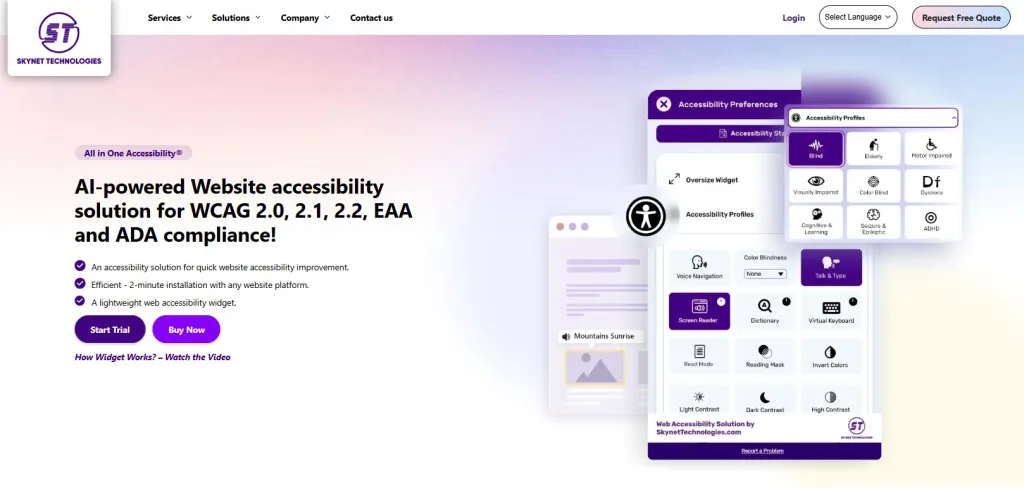
At the heart of All-in-One Accessibility is the on-screen accessibility toolbar. This is the panel that site visitors can open (usually by clicking a universally recognizable accessibility icon) to toggle various aids. Notable tools in the toolbar include:
- Screen Reader (Text-to-Speech): A built-in screen reader that can read aloud website text for users who are blind or visually impaired. This helps non-sighted users consume content without needing third-party software.
- Voice Navigation Commands: Users can navigate the site using voice commands, an impressive feature that lets someone say commands to scroll, click links, or go to different sections without a mouse. (Voice navigation currently supports 15+ languages for command input.) This is a game-changer for those with motor impairments or anyone who finds voice control more convenient.
- Keyboard Navigation Enhancements: For users who cannot use a mouse, the widget ensures the site is fully navigable via keyboard (e.g., using the Tab key). It also provides visible focus indicators and “skip to content” links to make keyboard navigation easier.
- Adjustable Text and Content: Users can change text size, font type (e.g., switch to a more readable font for those with dyslexia), line height, and letter spacing to improve readability. There’s even a text magnifier that acts like a virtual looking glass to zoom into paragraphs.
- Color and Contrast Adjustments: The toolbar offers various color profiles and contrast settings. For example, users can toggle high contrast mode for better visibility, switch to monochrome, or adjust colors to accommodate different types of color blindness. All-in-One Accessibility includes presets for conditions like protanopia, deuteranopia, tritanopia, etc., ensuring colorblind users can distinguish content clearly.
- Content & Vision Aids: Additional features help focus or simplify content. A reading mask can be enabled to highlight one line at a time (great for users with ADHD or reading disorders). There are options to highlight titles and links, or even hide all images if visual clutter is overwhelming. Users with epilepsy can turn off flashing animations to prevent seizures.
- Virtual Keyboard and Talk & Type: For those who cannot use a physical keyboard, a virtual on-screen keyboard is available, allowing input via mouse or touch. There’s also a “talk & type” feature which converts speech to text for form inputs, assisting users who have difficulty typing.
All these tools are user-triggered – meaning they activate only when a visitor chooses to use them, ensuring that those who need adjustments can have them, while others see the site normally. It’s a flexible approach that caters to a wide range of disabilities: visual, auditory, motor, cognitive, and more.
2. AI-Powered Accessibility Improvements
Under the hood, All-in-One Accessibility leverages AI to further enhance compliance. Two notable AI-driven features are:
- AI-Powered Accessibility Scanner: The platform includes a scanner that will audit your website for accessibility errors and WCAG violations. This helps site owners identify issues like missing alt text, form label errors, or contrast problems quickly via a dashboard. Instead of combing through code manually, you get an automated report of what needs fixing.
- AI-Generated Image Alt Text: Images without proper alt attributes are a common accessibility issue. All-in-One Accessibility can automatically generate alt text suggestions for images using AI. It maintains a list of images and recommended alt text, allowing you to review and apply them easily. This feature is extremely handy for large sites with many images, ensuring assistive technologies can describe visuals to users who can’t see them.
These AI features don’t magically solve everything, but they dramatically reduce the manual effort needed to achieve compliance. According to Skynet, the tool can help a website reach up to 90% WCAG compliance on its own, depending on the site’s structure. (For that remaining ~10%, manual tweaks or additional services may be needed, which we discuss later.)
3. Preset Accessibility Profiles
To streamline the user experience, All-in-One Accessibility offers one-click profiles that bundle relevant settings for particular needs. Instead of toggling dozens of options, a visitor can select a profile and have multiple adjustments apply instantly. For example:
- Visually Impaired Profile: Increases text size, enables the screen reader, and adjusts contrast to assist those with low vision.
- Blind Profile: Optimizes the site for use with screen reader and keyboard navigation only (useful for fully blind users who rely on audio feedback).
- Motor Impaired Profile: Adjusts navigation to be easier without a mouse (e.g., larger clickable areas, virtual keyboard) for visitors with motor disabilities.
- Color Blindness Profile: Applies a suitable color palette or allows quick toggling of color filters for colorblind users.
- Dyslexia Friendly Profile: May switch fonts to a dyslexic-friendly font and adjust spacing.
- Seizure Safe Profile: Turns off any animations or flashing content for those prone to seizures.
- ADHD Friendly Profile (Cognitive): Might enable the reading mask and focus features to reduce distractions on screen.
These profiles make it extremely easy for users to get a customized experience with a single click. The widget currently includes about 9 preset profiles addressing a range of impairments (blindness, motor, vision, cognitive, etc.). This kind of personalization ensures that the tool isn’t one-size-fits-all – it adapts to individual needs.
4. Easy Integration and Customization
A critical factor in any SaaS tool is how easy it is to set up and use. All-in-One Accessibility shines in this area:
- Quick Installation: You can add the widget to your site in literally 2 minutes. It’s as simple as pasting a small JavaScript snippet into your site’s header or footer. For popular platforms like WordPress, Shopify, Wix, etc., there are dedicated plugins and guides to make setup plug-and-play. In other words, no coding expertise is required.
- Lightweight & Fast: The script is lightweight and loads asynchronously, adding minimal impact on page load times (under 100ms). This addresses a common concern that accessibility widgets might slow down a site – in this case, the performance impact is negligible.
- Supports Any Platform: Whether your site is built on a CMS (WordPress, Drupal, Joomla), an e-commerce platform (Shopify, Magento, BigCommerce), or custom HTML, All-in-One Accessibility will work. In fact, it’s officially compatible with 300+ platforms out of the box (the Skynet website even lists over 365 specific CMS and site builders it supports). So you’re unlikely to run into integration issues regardless of your tech stack.
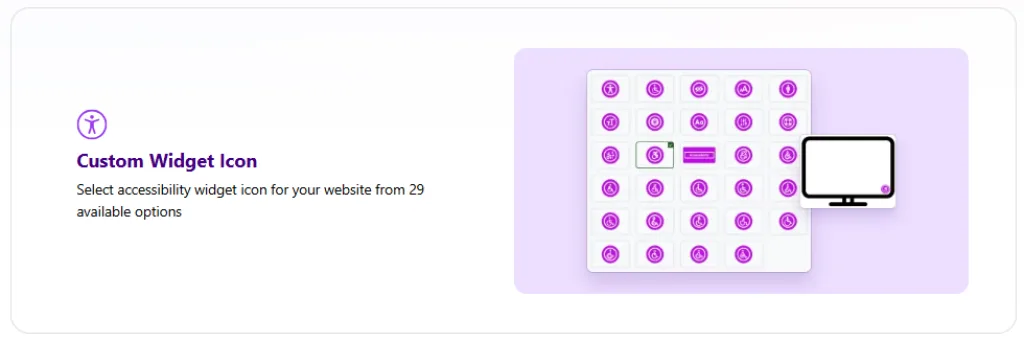
- Widget Design Customization: You have full control over the look and placement of the widget’s button and interface. Want the icon in the bottom left instead of bottom right? You can do that. Need to match your brand colors? You can customize the icon color and even choose from 20+ icon styles to find one that suits your design. Size adjustments ensure the widget doesn’t overwhelm your mobile layout. You can also configure how the menu opens and what features to show or hide. This level of customization is great for maintaining a seamless aesthetic, so the accessibility options feel like a natural part of your site rather than an intrusive overlay.
- Accessibility Statement & Analytics: The tool allows you to easily add an Accessibility Statement link within the widget, so users can read about your site’s compliance status and efforts (important for transparency). It also integrates with Google Analytics/Adobe Analytics to track usage of the widget, so you can see how often visitors are using accessibility features – useful data for understanding user needs.
5. Compliance with Global Standards
One standout feature is that All-in-One Accessibility is built to align with virtually every major accessibility standard and regulation out there. Right out of the box, it supports compliance with:
- WCAG 2.0, 2.1, 2.2 – The core Web Content Accessibility Guidelines (Level AA) which are the basis for most laws.
- ADA Title III (U.S.) – Ensuring public-facing websites are accessible as a public accommodation.
- Section 508 (U.S.) – Required for federal websites and often adopted by educational institutions.
- European EAA / EN 301 549 – Europe’s accessibility requirements for ICT, aligning with WCAG.
- UK Equality Act – Anti-discrimination law in the UK that covers website.
- Canadian ACA (Accessible Canada Act) and Ontario AODA – Canadian federal and provincial standards.
- Australian DDA – Australia’s Disability Discrimination Act requirements for web content.
- Other international standards: The widget also mentions support for standards like Japan’s JIS X 8341, Israel’s IS 5568, India’s guidelines, the Brazilian Inclusion Law, and more. In total, the solution covers compliance for laws in the USA, Canada, UK, EU, Australia, and beyond, so you can confidently do business globally without worrying about local accessibility rules.
By adhering to these standards, All-in-One Accessibility helps reduce your legal risk worldwide. A quick improvement on your site can be the difference between being lawsuit-proof or vulnerable in today’s climate of strict enforcement.
6. Privacy and Security Focus
Another aspect where All-in-One Accessibility excels is user privacy. The widget is designed with privacy in mind:
- No Personal Data Collected: It does not collect or store any personal identifiable information (PII) from your website users. All adjustments happen in the user’s browser locally. This means enabling the widget won’t compromise user privacy or put you at odds with data protection laws.
- ISO Certified & SOC 2 Compliant: Skynet Technologies is ISO 27001 (information security) certified, which indicates a high standard of data security management. They also comply with SOC 2 Type II requirements for service organizations, meaning their systems are audited for security and confidentiality.
- GDPR, COPPA, HIPAA, CCPA, etc.: The solution is built to support strict privacy regulations including Europe’s GDPR, the US children’s privacy law (COPPA), US health information law (HIPAA), and California’s Consumer Privacy Act (CCPA). In short, using this widget will not introduce privacy compliance issues – an important consideration for any external script you add to your site. Skynet has clearly made “Privacy at the core of accessibility” a guiding principle, as highlighted on their site.
For organizations concerned about data security, this focus on privacy provides peace of mind that an accessibility fix won’t create a security hole or privacy lapse.
7. Additional Add-Ons and Services
While the All-in-One Accessibility widget itself offers a robust out-of-the-box solution, Skynet Technologies also provides optional add-ons and services to further enhance accessibility:
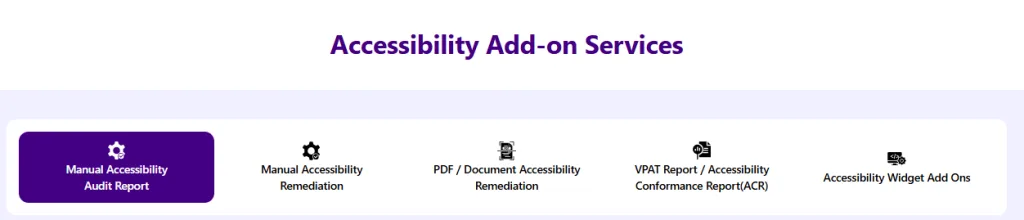
- White Label & Custom Branding: For an additional fee, you can remove the Skynet branding and get a white-labeled widget, including custom icons or texts. This is useful for agencies or larger companies that want the tool to appear 100% in-house.
- Manual Accessibility Audits: Automated tools can only go so far. Skynet offers professional manual audits by accessibility experts (per WCAG 2.1 AA standards) for those who want a comprehensive review of their site beyond what the AI scanner catches. They promise quick turnaround on audits (as fast as 7 business days for a full report).
- Accessibility Remediation Services: If you discover issues that require code fixes, Skynet’s team can help remediate your site’s code to be fully compliant (this could include fixing HTML, adding ARIA labels, etc., as a separate service). They even handle PDF/document accessibility remediation – useful if you have PDFs on your site that need to be readable by screen readers.
- Live Site Translation: An add-on that can provide real-time translation of your site’s content into other languages. Combined with the widget’s multi-language interface, this can make your site doubly accessible for non-English speakers with disabilities.
- Developer Tools and API: For advanced users, there are options to integrate the widget via APIs or get developer support for unique platforms.
These add-ons mean that as your accessibility needs grow, you can get everything from one vendor – from the DIY widget to hands-on consulting and development. It’s a scalable approach: start with the quick win of the widget, then address remaining gaps with expert help if needed.
Plans and Pricing
All-in-One Accessibility offers straightforward pricing based mainly on your website’s traffic (pageviews per month). There’s also a 10-day free trial (no advance payment; you won’t be charged if you cancel within 10 days) to let you try all features on your site risk-free.
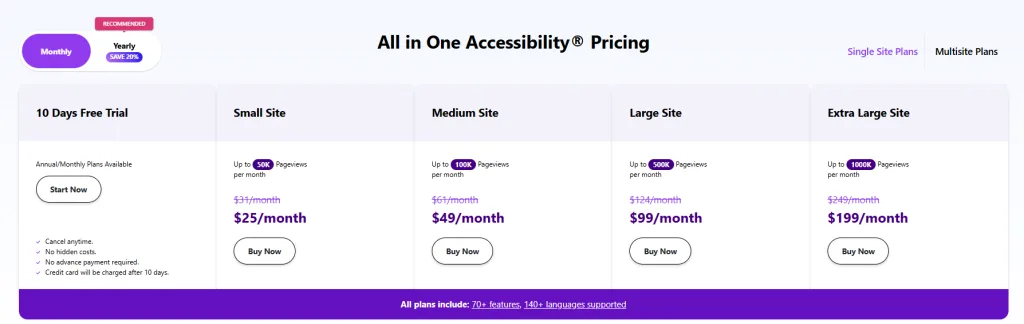
Here’s the breakdown for single-site plans (monthly billing is available, but annual plans save you ~20%):
- Small Site: Up to 50,000 pageviews/month –
$31/month, ~$25/month (or ~$250 billed annually). - Medium Site: Up to 100,000 pageviews/month –
$61/month, $49/month (or ~$490/month on annual plan). - Large Site: Up to 500,000 pageviews/month –
$124/month, $99/month (or ~$999/month annually). - Extra Large Site: Up to 1,000,000 pageviews/month –
$249/month, $199/month (or ~$1999/month annually).
All paid plans include the full set of 70+ features, regardless of tier. You simply choose the tier that matches your site’s size. This is great because you don’t have to pay more to unlock features; even a Small plan user gets the same toolbox as a Large plan user – the only difference is how much traffic the plan can accommodate.
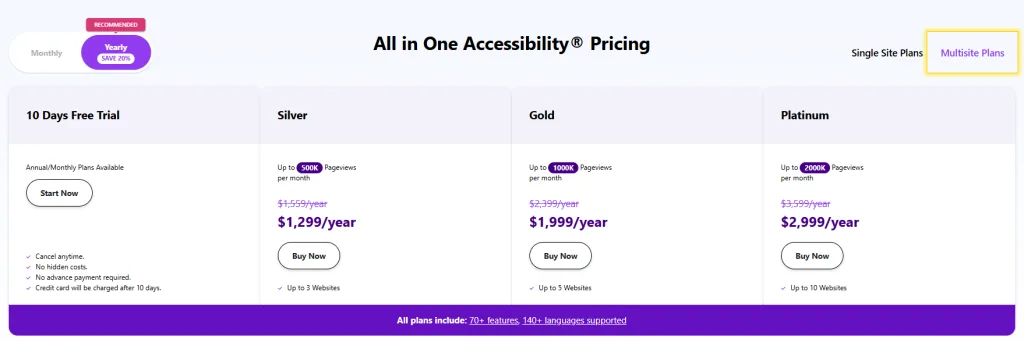
For agencies or those managing multiple sites, multisite plans are offered (annual billing only). For example, the “Silver” tier covers up to 3 websites, “Gold” covers 5, and “Platinum” covers 10, each with higher combined pageview limits. These multisite bundles are cost-effective if you need to implement the widget on a whole portfolio of sites.
Free Version: Notably, Skynet also provides a completely free version of the accessibility widget. The free plan (often called the “community” version) includes a limited set of 20+ features, such as basic font adjustments, color themes, and orientation aids – which still significantly improve accessibility. It supports all 140+ interface languages and global standards, just like the paid version.
The idea is to allow anyone to start improving their site’s accessibility at no cost. However, advanced features like the AI scanner, voice navigation, screen reader, or certain profiles are reserved for paid plans. The free widget is perfect for personal or small sites to get started, and you can upgrade to a paid plan anytime for the full feature set.
Overall, pricing is competitive with similar tools on the market and offers good value given the comprehensive features. For instance, some competing accessibility widgets charge ~$49/month for a very small site limit and then much higher for more traffic, whereas All-in-One Accessibility’s $49/month (annual) tier already covers a medium traffic site. Plus, the presence of a free trial and a free forever version shows confidence in the product – you can test it thoroughly before committing.
All-in-One Accessibility By Skynet Technologies vs Other Accessibility Solutions
How does All-in-One Accessibility stack up against other web accessibility solutions? The market has a few notable players like AccessiBe, UserWay, EqualWeb, and others that offer widgets or overlays for ADA compliance. While many of these tools share a similar goal (using automation to improve accessibility), there are some key areas where All-in-One Accessibility stands out:
| Feature/Aspect | All-in-One Accessibility | Other Popular Widgets |
|---|---|---|
| Language Support | 140+ interface languages (auto-detect user’s language), truly global support. | Typically 10–40 languages. For example, AccessiBe supports ~33 languages, which is far fewer. Multilingual sites benefit more from All-in-One. |
| Number of Features | 70+ features (free version has ~23; paid unlocks all) – covers a very wide range from basics to advanced (e.g. voice commands, profiles, AI scanning). | Varies by provider, often 25–40 features. Many competitors lack advanced tools like voice navigation or might not have as many preset profiles. |
| Compliance Coverage | Supports all major standards (WCAG 2.1, 2.2, ADA, Section 508, EN 301 549, ACA, AODA, etc.) out-of-the-box. Updates for new guidelines (e.g. WCAG 2.2) are included. | Most focus on WCAG 2.1/ADA compliance. They may not explicitly cover as many regional laws or the latest WCAG updates. All-in-One gives broader legal protection globally. |
| Customization & Branding | Highly customizable widget (colors, position, icon choices). White-label option available for branding (as an add-on). | Some offer basic color/position tweaks. White-labeling often not available or only on enterprise plans. All-in-One gives more flexibility even to small plan users. |
| Privacy & Security | No user data collected; company is ISO 27001 certified and compliant with GDPR, HIPAA, CCPA, etc. This widget won’t compromise site privacy. | Varies; some competitors also claim not to store data, but not all have third-party certifications or explicit privacy law compliance. All-in-One’s strong privacy stance is a differentiator for security-conscious organizations. |
| AI Capabilities | AI-based fixes: automated audits and AI alt-text suggestions included in dashboard. Improves compliance up to ~90% automatically. | Many also use AI (e.g., AccessiBe’s AI scans sites every 24 hours). The difference is often in what’s included at what price. All-in-One includes the AI scanner in all plans, whereas some rivals charge more for similar scanning or provide less transparency on results. |
| Platform Compatibility | Works on 300+ platforms (CMS, e-commerce, LMS, etc.) – practically any website. Also has plugins/modules for easy installation on popular systems. | Most accessibility overlays work on any website via a script, but not all have official plugins or dedicated support for as many platforms. All-in-One’s documentation covers a huge range (even less common CMS). |
| Pricing Value | Free trial 10 days; free basic widget forever. Paid plans from ~$25/mo (annual) for 50k visits. All features available on all tiers. Multisite bundles for agencies. | Many competitors have similar pricing by traffic, though some may not offer a free version. For instance, AccessiBe starts ~$49/mo for small sites and can go up significantly for high traffic. All-in-One tends to be cost-effective for the feature breadth, and the free option is a big plus for small sites. |
| Unique Extras | Voice navigation commands; 9 preset profiles; Virtual Keyboard for motor-impaired; robust multi-language and translation add-on; direct phone support. Also offers related services (audits, remediation) if needed, making it a one-stop-shop. | Each competitor has some unique quirks but few have voice control or the depth of profiles All-in-One has. Some competitors might excel in other areas (e.g., one might have an automated PDF reader, etc.), but overall All-in-One is one of the most feature-rich solutions in 2025. |
In summary, All-in-One Accessibility holds its own and in many ways leads the pack. Particularly for organizations that need global language support, or who value strong privacy assurances, it outshines alternatives. Its pricing is fair and transparent, and the availability of additional services means you can stick with one provider as your needs grow. Competitors like UserWay and AccessiBe are certainly viable, but they may fall short on certain features (fewer languages, less customization) or require higher-tier plans to match what All-in-One offers in a base plan.
One important note: No overlay widget can guarantee 100% compliance with accessibility standards. This is true for All-in-One and any competitor. Complex issues like proper document structure or certain interactive functionality might need manual development work.
The goal of these tools is to get you most of the way there (and avoid the majority of legal trouble) quickly. All-in-One Accessibility, with claims of up to 90% automated compliance, does a terrific job closing the gap, and its makers are transparent that truly perfect compliance may require additional fixes on extremely complex sites.
In practice, many customers use the widget to dramatically improve accessibility and then address any remaining issues manually or with the help of Skynet’s team.
Pros and Cons of All-in-One Accessibility
Like any product, All-in-One Accessibility has its strengths and a few limitations. Based on our research and user feedback, here’s an honest look at where the tool shines and where you might encounter challenges:
Despite these minor downsides, All-in-One Accessibility’s pros heavily outweigh the cons. It delivers on its promise of quick, significant accessibility improvements and provides ongoing value with updates and support. The cons are either common to all similar tools or easily mitigated (for example, by doing a one-time manual audit to catch what the widget can’t).
Real-World Use Cases and Success Stories
All-in-One Accessibility is already used by a variety of organizations, from small businesses to large institutions. Skynet’s website showcases numerous real-world examples across different industries, including:
- E-Commerce Stores: Online retailers (from fashion boutiques to specialty shops) have implemented the widget to ensure shoppers with disabilities can browse products and complete purchases smoothly. For instance, Official Band Shirts (an online music merchandise store) and Dive Right In Scuba (a scuba gear retailer) are cited as users of the tool. These stores likely saw reduced bounce rates and a larger customer base after making their sites more accessible.
- Education and Government: Institutions like UC Berkeley (as indicated by their logo on the Skynet site) and local government sites (e.g., Irvine’s water district site) have trusted All-in-One Accessibility to serve their diverse audiences. For a university, this means all students, including those with visual or cognitive impairments, can access course materials and info. For government websites, it ensures compliance with laws and equal access to public resources.
- Healthcare and Law: Healthcare providers use it to make appointment booking and health information accessible (e.g., adding screen reader support for visually impaired patients). Law firms (like Dhillon Law, whose logo appears in the “trusted by” section) use it to ensure their content is perceivable by all clients – which is doubly important as law firms advise on ADA compliance themselves.
- Small Businesses: Countless small and medium businesses have added the free or paid widget simply to avoid ADA lawsuits and be inclusive. For example, a small boutique shop owner can install the free widget to instantly get basic protections (like adding alt text, contrast control, etc.), demonstrating a good-faith effort toward compliance, which can deter legal action. Many have reported it as a “quick win” for accessibility and appreciate how user-friendly it is for both the site owner and visitors.
- Agencies & Developers: Web design agencies use All-in-One Accessibility as a value-add for clients. Instead of manually coding every accessibility feature (which can be cost-prohibitive), they install the widget, configure it, and focus remaining efforts on core issues. This hybrid approach speeds up project delivery and ensures client sites meet requirements. Agencies in the Skynet partner program also benefit from wholesale pricing and dedicated support, making it a smart offering for their customers.
These examples show that practical applications span across sectors. Whether you run an online store, a school website, a corporate portal, or a nonprofit blog, improving accessibility with a tool like this can lead to tangible benefits: more users served, improved customer loyalty, and peace of mind that you’re doing the right thing (and staying on the right side of the law).
Frequently Asked Questions (FAQ)
Does using All-in-One Accessibility mean my website is fully ADA/WCAG compliant?
Using the widget will greatly improve your compliance – potentially up to ~90% of WCAG requirements, but no automated tool can guarantee 100% compliance. All-in-One Accessibility addresses most common issues (missing alt text, navigation, color contrast, etc.) and will significantly reduce the risk of accessibility-related legal issues. However, very complex sites or unique widgets on your site might still need manual fixes. It’s best to use the widget and follow web accessibility best practices in your underlying code for optimal results. Skynet does offer manual audits and remediation services if you want that last 10% taken care of by experts.
How do I install All-in-One Accessibility on my website?
Installation is straightforward. After signing up, you’ll receive a small JavaScript snippet. You simply paste this code into your site’s HTML (in the footer or via a tag manager), and the widget will appear on your site. No complex configuration needed. If you’re on WordPress, Shopify, Wix, or other popular platforms, there are plugins/apps available – you often just install the plugin and enter your widget ID or API key. The whole process takes only about 2 minutes. Skynet’s knowledge base provides step-by-step guides for all supported platforms, and support is available if you run into any trouble.
Is there a free version or trial?
Yes, you have both options. There’s a 10-day free trial of the full product (no credit card required initially), so you can test all premium features on your live site. There’s also a free forever version of the widget which includes a subset of features (about 20+ tools covering basics like text, color adjustments, etc.). The free version still supports 140+ languages and basic compliance, which is fantastic for small sites or personal blogs to get started. You can upgrade from the free version to a paid plan at any time to unlock features like the screen reader, voice commands, AI scans, and more.
Will the widget slow down my website or affect performance?
No – the All-in-One Accessibility widget is designed to be lightweight. It loads asynchronously (meaning it doesn’t block your page from loading) and typically adds under 100ms of load time, which is negligible. In practice, users won’t notice any difference in your site’s speed. Skynet also regularly updates the script for performance. Many users have reported that even on image-heavy pages or slower servers, the widget’s impact is minimal to none.
What kind of support and updates can I expect?
As a subscriber, you’ll receive regular updates to the widget automatically – including new features (they added support for WCAG 2.2 guidelines as those were released, for example) and new language/localization updates. Support is robust: you can contact the Skynet team via email, phone, or support ticket. They are known to be responsive and even offer to hop on calls, which is reassuring if you ever face an urgent issue. The online knowledge base and community forums also cover a lot of common questions. Since the company is an active member of accessibility standards organizations, you can trust that the product will stay current with the latest best practices.
Who would you recommend All-in-One Accessibility to?
This solution is recommended for any website owner or administrator who wants a fast and effective way to improve accessibility. If you’re overwhelmed by the complexity of WCAG guidelines or don’t have the budget to hire an accessibility expert, this tool can be a lifesaver. It’s especially useful for: small businesses trying to avoid ADA lawsuits, e-commerce sites aiming to serve all customers (and boost sales in the process), content-heavy sites like blogs or news that want better UX for disabled readers, and agencies managing multiple client sites. Even large enterprises can use it as a quick patch while working on longer-term native fixes. Essentially, if inclusivity and compliance matter to you (and they should!), All-in-One Accessibility is worth considering.
Conclusion: Our Verdict
After an in-depth look at Skynet’s All-in-One Accessibility, it’s clear that this tool offers an impressive, well-rounded solution for web accessibility needs. It packs a powerful set of features – from AI-driven compliance checks to user-friendly customization options – into a widget that truly lives up to the “all-in-one” name. The convenience of installation and the breadth of issues addressed make it feel like a “one-click accessibility” button for your site, as many users have noted.
No solution is perfect, but All-in-One Accessibility strikes an excellent balance between automation and flexibility. It empowers users with disabilities to tailor their experience, while giving site owners peace of mind that major accessibility gaps are covered. The commitment to privacy and adherence to global standards further cements its position as a leading accessibility tool in 2025.
Actionable takeaway: If you’ve been postponing accessibility improvements because it seemed too daunting or expensive, All-in-One Accessibility offers a practical path forward. You can start with the free widget to make immediate improvements, or dive into the free trial to experience the full feature set. In a matter of minutes, you’ll be actively enhancing your site’s inclusivity. From there, you can decide if the benefits (happier users, reduced legal risk, SEO perks) are worth the investment in a paid plan. For most, the answer will be yes.
In our view, All-in-One Accessibility is absolutely worth checking out for anyone serious about ADA/WCAG compliance and providing a great experience for all visitors. It’s a modern, continually improving solution that can help make the web a more accessible place, one website at a time. Give it a try and take the first step towards leveling up your website’s accessibility – your users (and search engines) will thank you!


Snehil Prakash is a serial entrepreneur, IT and SaaS marketing leader, AI Reader and innovator, Author and blogger. He loves talking about Software's, AI driven business and consulting Software business owner for their 0 to 1 strategic growth plans.