The trend of using writing toolkits instead of going with individual tools is increasing day by day. Whether you are a student, professional, or content creator, having all necessary writing and productivity tools in one place is often more convenient than switching between multiple websites and tools.
This shift has brought many platforms into the spotlight, and Editpad is one of them. It offers a wide range of online tools that help users write, edit, refine, and proofread content for better quality.
So, I have decided to write an honest review of Editpad by discussing its features, pricing, tools, and much more. So, stick with me until the end.
Editpad Overview

Editpad is primarily known for its online notepad, which also offers AI-powered writing assistance. Besides note-taking, there are several other writing tools available as well, such as a paraphraser, summarizer, humanizer, plagiarism checker, and grammar checker.
Its notepad helps users quickly jot down important ideas, thoughts, information, and reminders without facing any digital distractions. No sign-up or registration is required for note-taking.
Key Features of Editpad (as an Online Text Editor)
Below, we have discussed some of the most notable features that Editpad offers.
- Built-in AI Assistant: It offers an AI-powered note-taking assistant that will help you create any type of notes or content by entering a prompt, topic, keyword, or instruction.
- Formatting Options: Editpad’s online text editor offers a range of features to help users organize and format the notes in a clear and professional manner. The key options are adding headings, inserting bullet points and numbered lists, and many more.
- Multilingual Support: It supports note-taking in 20+ languages, making it a suitable option for a global audience.
- Floating Window: The notepad is available in a floating window option, which allows users to continue the note-taking process when working in different tabs and applications.
Popular Writing Tools Offered by Editpad
Now, I am going to take a closer look at the most popular writing tools offered by Editpad.
1. Paraphraser
Editpad offers an AI-powered paraphraser that will help you refine content for better quality with minimal effort. It works to effectively restructure the given text to make it clearer, more readable, fluent, and original.
For this, it makes multiple changes such as changing words with synonyms, altering sentence structure, and removing fluffy words. While making these changes, Editpad paraphraser ensures that the original meaning of the text remains intact.
When it comes to features, it comes with multiple modes to fulfil the paraphrasing needs of a wider audience. Each mode will help you adjust the content tone into a specific writing style.
In the free version, Editpad paraphraser allows you to process up to 1,000 words at once. To upgrade this limit, a premium subscription will be required. Additionally, it is capable of rephrasing text in multiple languages, making it useful for a wider range of users.
Testing the Tool:
Now, I am going to rephrase sample content using this tool. So that you can better understand how it produces a better version.

As can be seen, the Editpad paraphrasing tool has produced a better version of the input text by making a range of changes. And the original context of both input and output remains the same.
| Pros | Cons |
| Multiple writing modes | Only four modes are available for free |
| Support for different languages | |
| Highlights changes in the output | |
| 1,000-word limit |
2. Summarizer
Editpad Summarizer is specifically designed to help users condense lengthy text into concise and precise summaries in just a few clicks. It can be used for extracting key points from blogs, research articles, journals, essays, product descriptions, and other types of text.
It can help simplify your writing workflow in multiple ways for better productivity. For instance, this tool can be used for extracting main information from lengthy research material, eliminating the need for you to manually read content from start to end.
Moreover, Editpad Summarizer is quite useful for removing repetitive, unnecessary, and redundant information without compromising quality or the original meaning. The feature I love is “Summary Length Adjuster.” This will allow you to generate summaries of personalized length.
An “Advanced AI” mode is also available for users looking to perform deep summarization. Finally, it can summarize up to 3,000 words for free.
Testing the Tool:
Let’s summarize a 400-word content with Editpad Summarizer to see how it removes unnecessary information and comes up with a summarized version.

The 400 words are converted into a 225-word summary for quick and effective reading. Another thing I noticed in the output was that it contains new words and phrases that were not present in the source text.
This suggests that Editpad Summarizer can generate an abstractive-style summary instead of simply copying sentences from the source text.
| Pros | Cons |
| Fast and easy to use | Advanced AI mode is a paid feature |
| Advanced AI mode | |
| Generates summaries of personalized lengths | |
| Multilingual support | |
| 3,000-word limit |
3. AI Humanizer
AI-generated content can sometimes lack creativity, natural flow, and human touch. That’s why it often gets flagged by AI detectors, resulting in work rejection and a damaged reputation. To solve this problem, Editpad has an AI-powered humanizer.
It will help you make AI-generated text look genuine, fluent, and human-written without spending much time and effort. The AI Humanizer restructures AI text by eliminating robotic wording, changing phrases with more appropriate synonyms, and simplifying the overall sentence structure.
The primary objective of these changes is to break the monotonous pattern of AI and make it look like it was written by a human.
Moreover, Editpad AI Humanizer comes with two modes: Basic and Advanced. Both modes are free to use and work on completely different humanization approaches from each other.
Additionally, it allows you to humanize AI content in five languages, including English, French, Spanish, Italian, and Portuguese.
Testing the Tool:
I have generated an essay using AI and am now going to process it through Editpad Humanizer. Let’s figure out how it makes changes to break the pattern of AI.

So, the AI Humanizer has produced a new version by changing words and altering sentence structure. To me, the output looks far more human-written than the original one. However, if you aren’t satisfied, you can make further edits or try another pass.
| Pros | Cons |
| Simple to use | 400-word limit for free users |
| Two humanization modes | |
| Support for different languages | |
| Keeps the original meaning intact |
4. Plagiarism Checker
Both search engines and readers prefer interacting with content that is unique and original. To ensure this, Editpad has a freemium plagiarism checker. It is available in both free and paid versions and compares the given text with millions of already published online resources to find any similar matches.
If any duplication is found, the tool will highlight it along with the original source. So that, you can easily perform verification and take necessary steps to eliminate plagiarism.
Additionally, Editpad Plagiarism Checker also offers a percentage of both unique and duplicate content. This way, you will have a good idea about the overall score of the content. It also provides the option to download and share the scan results.
Furthermore, this tool is capable of scanning content for plagiarism in 15 different languages, making it a versatile option for a global audience.
Testing the Tool:
I am going to scan content that contains a mix of unique and duplicate sentences with this online plagiarism checker. The scan result is below.
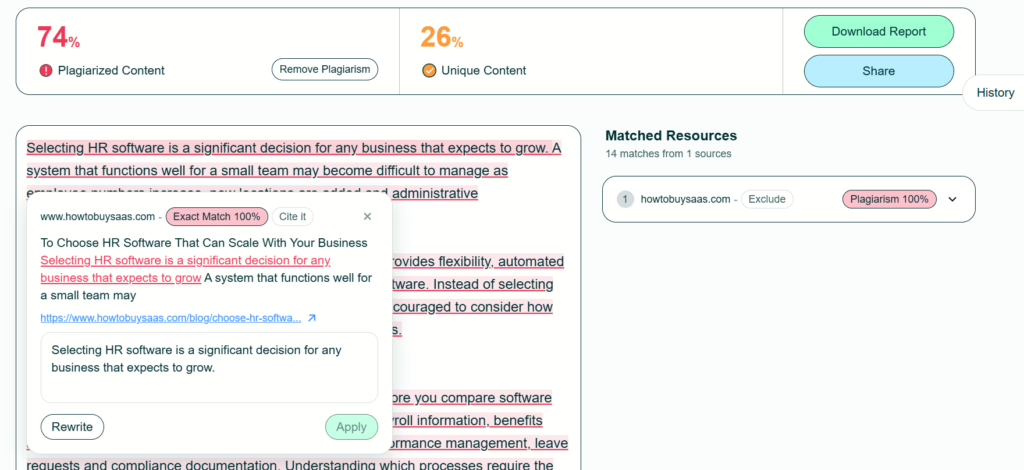
In the test, the tool identified the duplicate sentences and displayed their matched sources. You can do the same as well and make sure whether your write-up is original before submitting or publishing it online.
| Pros | Cons |
| Can detect the smallest instances of plagiarism | 300-word limit for free users |
| Highlights copied sources with original sources | |
| Provides a percentage of both unique and plagiarized text | |
| Option to download and share scan results |
5. Grammar Checker
In writing, proofreading is considered one of the most important yet time-consuming tasks. Editpad makes it simpler, quicker, and more efficient by offering a specialized AI-powered grammar checker.
It quickly analyzes the entered text for grammar, spelling, and punctuation errors. When identified, the grammar checker highlights them in different colors: Grammar in red, Spelling in Yellow, and Punctuation in Blue.
The Editpad Grammar Checker also assists in fixing the errors by offering contextually appropriate suggestions. All you need to do is simply click on the mistake, and a drop-down menu will appear displaying the suggestion.
Besides this, a “Fix All” button is also available, which you can use to correct all mistakes in one go. Just like other tools offered by Editpad, this AI grammar checker supports working in multiple languages.
Testing the Tool:
Now, let’s scan a text that contains a number of mistakes to see whether the AI grammar checker can catch them.

The tool accurately identified and highlighted the mistakes, which I fixed by clicking the “Fix All” button appearing at the top right corner of the tool’s interface.
| Pros | Cons |
| No signup required | Can sometimes skip punctuation errors |
| Can detect and fix a wide range of grammatical errors | |
| Highlights errors in different colors | |
| Fix all mistakes with a click | |
| Supports grammar checking in multiple languages |
6. AI Paragraph Generator
Editpad’s AI Paragraph Generator allows you to generate relevant and engaging paragraphs by providing a prompt. This will save you valuable time and effort.
To fulfill the diverse content creation needs of a large audience, it supports paragraph generation in different types, including descriptive, narrative, expository, and more.
Moreover, it even provides the option to adjust the length of the generated paragraph, either concise or detailed. You can also choose the format of output: a plain paragraph or bullet points.
The feature I liked is “Count,” which allows creating multiple paragraphs for a single input. This way, you will have the choice to go with the most suitable version. Editpad AI Paragraph Generator is available for free and capable of generating paragraphs in multiple languages.
Testing the Tool:
I am going to generate a descriptive paragraph on this topic: What is dehydration? Let’s see how Editpad will create a well-written paragraph.

So, the tool has generated a well-written paragraph according to the given prompt. The output is fluent and easy to read.
| Pros | Cons |
| Free to use | Not useful for creating detailed content |
| Generates high-quality content with a single click | |
| Option to adjust paragraph length and format | |
| Creates multiple paragraphs for a single input | |
| Supports different languages |
Non-Writing Tools Offered by Editpad
Editpad also offers multiple non-writing tools that I have briefly mentioned below.
- Image to Text: It will help you extract text from images, scanned documents, handwritten notes, and invoices in an editable format. You can say goodbye to manual text extraction now.
- JPG to Word: Instead of manually inserting images into a Word document, you can use this tool to quickly transform several photos into an MS Word document without damaging their quality in terms of resolution.
- Text to PDF: It will allow you to seamlessly convert simple text or Word documents into a well-formatted and professional PDF file for free.
Pricing
Editpad offers multiple premium subscription plans for users with different budget requirements. I have attached a screenshot below so that you can get a better idea about how much each plan costs and what it offers.

What to Expect
If you are planning to use Editpad in 2026, then you can expect a platform that goes far beyond simple note-taking. It offers a wide range of AI-powered writing tools that will help you write, refine, edit, and proofread content while staying within a single platform.
Besides writing, Editpad is also equipped with multiple productive tools that will help you streamline and automate routine tasks. The overall interface is simple and straightforward, making it accessible for both beginners and experienced users.
All tools come with a free version and do not require sign-up or registration, ensuring quick access for all users.
Closing Thoughts
When it comes to writing and productivity toolkits, Editpad is a name that immediately comes into the spotlight. It is primarily an online notepad and text editor, but it also offers a wide collection of writing tools to save users time and effort. In this detailed review, I personally used its popular tools and found their performance satisfactory. The free usage and multilingual support further boost its versatility.


Snehil Prakash is a growth leader in saas and it industry. He has lead multi million dollar businesses in this space and currently the CEO of Techlithic solutions LLC that owns brands like howtobuysaas, sendwo and work as venture partner for businesses to raise captial or going to the IPO way. Reachout to him to learn more.