A polished software demo can make almost any facilities platform look easy. A request appears on a dashboard, a technician taps a button, and a report materializes seconds later.
Real operations are less tidy.
A leaking pipe is reported without an asset number. A contractor finishes the job but forgets the photos. An invoice arrives before the work order is closed. One building calls an air-handling unit “AHU-4,” while another records the same type of equipment as “North Roof HVAC.”
The right Facilities Management Software must cope with that reality. It should support the way work happens across buildings, technicians, contractors, occupants, finance teams, and compliance staff. That is why experienced buyers begin with workflows and outcomes rather than feature lists or generic sales demonstrations.
This guide provides a practical SaaS buyer’s checklist for comparing facility management systems without getting distracted by impressive dashboards, vague artificial intelligence claims, or low introductory prices.
Why Facilities Management Software Purchases Go Wrong
The first source of confusion is the category itself. “Facilities Management Software” is often used as a broad label for several overlapping types of systems.
ISO defines facility management as an organizational function that integrates people, place, and process within the built environment to improve quality of life and the productivity of the core business. A suitable software platform should therefore support operational goals, not simply digitize maintenance tickets.
The main software categories differ in scope:
| Software category | Primary focus | Usually suitable for |
|---|---|---|
| CMMS | Work orders, preventive maintenance, asset history, labor, and spare parts | Maintenance-led teams that need control over equipment and repair work |
| CAFM | Facilities operations, maintenance, space, services, drawings, and workplace processes | Organizations managing buildings, occupants, rooms, and service delivery |
| IWMS | Real estate, leases, space, workplace experience, capital projects, and facilities | Larger property portfolios requiring an integrated workplace and real estate platform |
| EAM | Enterprise-wide asset lifecycle, reliability, procurement, inventory, and risk | Asset-intensive organizations with complex or mission-critical equipment |
| Point solution | One defined function, such as inspections, room booking, or contractor dispatch | Teams with a narrow problem and an existing system of record |
IBM describes a CMMS as a centralized system for documenting and managing maintenance operations. CAFM has a broader facilities focus, while EAM extends across the full operational asset lifecycle. These products increasingly overlap, so buyers should evaluate what a platform can actually do rather than relying on the category printed on its website.
A team primarily concerned with recurring inspections and preventive work may need maintenance planning software rather than a full workplace suite. A corporate real estate department managing leases, occupancy, moves, capital projects, and maintenance across hundreds of sites may need a wider IWMS or enterprise platform.
Buying too little creates gaps and duplicate systems. Buying too much creates a costly platform that employees struggle to adopt.
The second common mistake is treating facilities management and maintenance as a software project owned only by the facilities department. Finance may need purchase-order and invoice data. Information technology will review security and integrations. Procurement will negotiate terms. Technicians and contractors will determine whether the mobile workflow succeeds in practice. Facilities software buying guides consistently recommend involving these users before the shortlist is finalized.
Define the Operating Problem Before Contacting Vendors
Do not begin with a list of products. Begin with a short description of the operation the software must support.
Document the number of sites, buildings, users, technicians, contractors, assets, work orders, languages, currencies, and regulatory environments in scope. Include building types and operational differences. A hospital campus, a distribution network, a school district, and a portfolio of corporate offices may all use work orders, but their priorities and approval processes will differ.
Your requirements brief should answer six questions.
- What is failing today?
Examples include slow response times, incomplete asset histories, missed inspections, weak contractor control, poor inventory visibility, or reporting that depends on spreadsheets. - What outcome must improve?
Set measurable targets such as reducing overdue preventive work, shortening work-order completion time, increasing asset-data completeness, or eliminating duplicate invoice entry. - Who performs each step?
Identify requesters, dispatchers, technicians, supervisors, contractors, procurement staff, finance users, administrators, and executives. - Which systems already hold important data?
These may include an ERP, accounting platform, HR system, building automation system, identity provider, procurement tool, lease database, energy platform, or business intelligence application. - Which requirements are mandatory?
Separate legal, security, operational, and contractual requirements from features that would merely be convenient. - What would make the implementation fail?
Typical risks include poor mobile adoption, incomplete asset data, slow integrations, insufficient internal ownership, weak vendor support, or a rollout covering too many sites at once.
Watching employees perform the current process is often more useful than discussing an idealized process in a conference room. Observe how a technician receives work, finds an asset, records labor, requests a part, and closes a job. Look at the spreadsheets, group chats, paper forms, and unofficial workarounds that keep the operation moving. MRI’s facilities selection guidance specifically recommends studying frontline execution because real workflows frequently differ from documented procedures.
Turn those observations into use cases. A useful requirement describes an actor, an event, a workflow, and an expected result.
For example:
When an occupant reports a water leak by scanning a location QR code, the system should identify the building and floor, create a priority request, notify the correct response team, start the service-level timer, and allow the assigned technician to document labor, parts, photographs, and resolution from a mobile device.
That is more valuable than a spreadsheet row that says “work order management: required.”
The Facilities Management Software Buyer’s Checklist
Use the following checklist to evaluate each SaaS vendor against the same requirements.
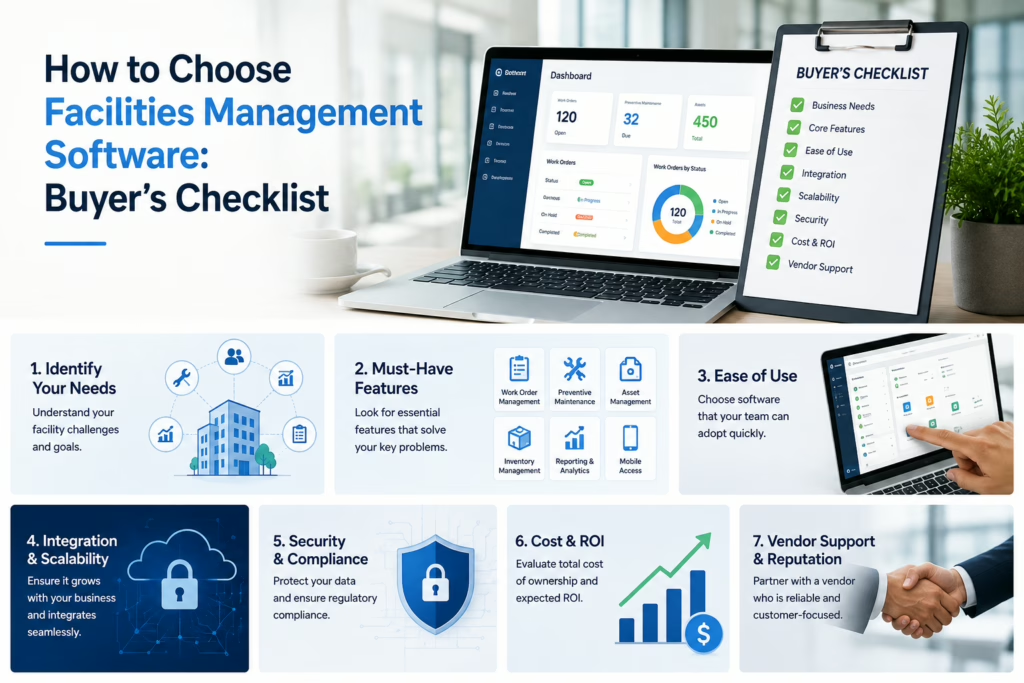
Start with operational fit
- Can the system represent your site, building, floor, room, system, and asset hierarchy?
- Can different locations use different workflows, priorities, calendars, and approval rules?
- Can administrators configure forms and routing without paid custom development?
- Can the system support internal technicians, external contractors, or both?
- Can it separate organizations, regions, departments, clients, or cost centers when required?
Facilities software should match the portfolio and team structure rather than forcing every location into one rigid process. Multi-site visibility, configurable workflows, and role-specific access are particularly important for distributed operations.
Test work-order and service-request depth
A credible work-order module should do more than create and close tickets. Check whether it supports:
- Request intake through web forms, email, QR codes, mobile apps, portals, or integrations
- Automatic routing by location, asset, trade, priority, availability, or contract
- Statuses, approvals, escalations, service-level timers, and notifications
- Labor, travel, parts, tools, documents, photographs, signatures, and costs
- Parent-child work orders and multi-trade jobs
- Reopened work, follow-up work, and incomplete-work reasons
- Requester updates and satisfaction feedback
- Full timestamps and an auditable history of changes
Work-order management, asset records, maintenance scheduling, notifications, vendor coordination, and reporting appear consistently among the core capabilities identified by major facilities software guides and review directories.
Examine preventive and condition-based maintenance
Ask how the system creates recurring work. Schedules may be based on dates, operating hours, meter readings, seasons, inspection results, sensor conditions, or another completed task.
Then test the exceptions. What happens when a recurring job is missed? Can the next task be suppressed, rescheduled, escalated, or created anyway? Can the system distinguish planned dates from regulatory due dates? Does changing an asset automatically affect its maintenance schedule?
For each planned task, look for job plans, safety instructions, required skills, estimated hours, parts, permits, checklists, acceptable readings, and escalation rules. Preventive maintenance is routinely identified as a core FM capability, while sensor and Internet of Things integrations are better treated as optional unless the organization already has the necessary data and infrastructure.
Inspect the asset register
The asset database will become the foundation for maintenance history, cost analysis, compliance records, and replacement planning. Verify that it can store:
- Asset type, make, model, serial number, and barcode or QR code
- Location and parent-child relationships
- Criticality, condition, status, and ownership
- Purchase, installation, commissioning, and expected replacement dates
- Warranty and service-contract details
- Manuals, photographs, drawings, certificates, and safety documents
- Maintenance, failure, downtime, labor, parts, and cost history
- Meter readings and condition measurements
- Financial codes and replacement values
Also ask how duplicate assets are detected, how retired assets are handled, and whether historical work remains available after an asset is moved or decommissioned.
CMMS and EAM platforms use centralized asset information to document maintenance activity and support lifecycle decisions. IBM distinguishes maintenance-centered CMMS capabilities from the broader lifecycle scope of EAM, which can include planning, supply chain, and environmental, health, and safety processes.
Put the mobile application in a technician’s hands
A desktop demonstration says little about field usability. Ask a technician to complete a realistic job on the same type of device used at your sites.
Check whether the mobile experience supports:
- Offline work with reliable synchronization
- Fast search and barcode or QR scanning
- Voice-to-text, photographs, annotations, and signatures
- Access to asset history and technical documents
- Labor, parts, readings, and checklist entry
- Push notifications and reassignment
- Secure login without repeated interruptions
- Clear error messages when synchronization fails
Count the taps needed to accept, start, update, and close a routine job. A platform with hundreds of capabilities can still fail if technicians avoid recording work because the mobile process is slow.
Mobile access is repeatedly identified as a core requirement in facilities buying guides, particularly for teams working across large or distributed sites. Pilots with real users reveal workflow problems that scripted demonstrations often conceal.
Evaluate contractor and vendor controls
Organizations that outsource maintenance need more than a contact directory. Check for:
- Contractor onboarding and credential approval
- Insurance, license, certification, and expiration tracking
- Trade, geography, rate, availability, and performance records
- Quote requests and approval thresholds
- Dispatch acceptance and reassignment
- Check-in, check-out, proof of service, and completion evidence
- Purchase-order and invoice matching
- Warranty recovery and recall tracking
- Service-level performance and dispute history
- Restricted access to relevant sites and work orders
Ask whether contractors need paid user licenses and whether they can use a browser portal instead of installing an application. Contractor licensing can materially change the total cost for organizations with a large supplier network.
Vendor management, contractor coordination, service-level tracking, and invoice control are common requirements in broader facilities platforms, especially for multi-location operations.
Check inventory, purchasing, and cost controls
A maintenance platform should show whether required parts are available before work is scheduled. Relevant capabilities include storerooms, bins, stock levels, reservations, issues and returns, transfers, cycle counts, reorder points, suppliers, lead times, and part-to-asset compatibility.
For purchasing, test the path from a technician’s request to approval, purchase order, receipt, work-order consumption, and invoice. Determine whether the FM system will own that process or exchange data with an ERP.
Integrations with accounting, ERP, HR, and procurement platforms can reduce duplicate entry, but only when the data owner and direction of synchronization are clearly defined. Open or well-documented APIs reduce dependence on one-off custom development.
Assess compliance and document control
Software does not make an organization compliant by itself. It should, however, make required work easier to schedule, prove, retrieve, and audit.
Look for:
- Inspection and certification schedules
- Version-controlled procedures and forms
- Mandatory completion fields
- Electronic signatures and timestamps
- Exception and nonconformance tracking
- Corrective and preventive actions
- Permit and safety-document attachments
- Immutable or controlled audit history
- Retention rules and legal holds
- Exportable audit packs
ISO 41001 is a management-system standard for effective, efficient, and sustainable facility management. It is not simply a software feature list. Buyers can use its principles to evaluate whether a platform supports organizational objectives, interested-party requirements, governance, and continual improvement. The currently published ISO 41001:2018 is under revision, so regulated or standards-led organizations should check the latest status during procurement.
Demand useful reporting, not dashboard decoration
Ask each stakeholder which decisions the system must support. Then require the vendor to produce those reports during the demonstration.
Useful measures may include:
- Work-order response and completion time
- Preventive maintenance completion
- Planned versus reactive work
- Backlog size and age
- Repeat failures
- Asset downtime and availability
- Labor utilization
- Contractor service-level performance
- Maintenance cost by site, asset, trade, or failure type
- Inventory usage and stockouts
- Inspection exceptions
- Occupant satisfaction
- Space utilization or energy performance, when in scope
Reports should allow filtering, drill-down, scheduled delivery, and export. Confirm whether customers can create reports themselves or must pay the vendor for each change.
Reporting quality depends on data quality. Standardized naming, mandatory fields, validation rules, and clear data ownership are therefore part of the reporting requirement, not separate administrative concerns.
Map every required integration
For each integration, specify:
| Question | Example |
|---|---|
| Which system owns the record? | ERP owns supplier and purchase-order data |
| What data moves? | Vendor ID, order number, amount, status |
| Which direction does it move? | ERP to FM system, or two-way |
| How quickly must it update? | Real time, hourly, nightly |
| What happens when it fails? | Retry, alert, queue, manual review |
| How is it secured? | OAuth, service account, private connection |
| Who monitors it? | Internal IT team, vendor, or integration partner |
| Who pays when an API changes? | Customer, software provider, or implementation partner |
Ask for actual API documentation before signing, not a slide stating that an API is “available.” Confirm rate limits, webhooks, authentication methods, sandbox access, API versioning, and whether the required endpoints are included in your subscription.
Facilities platforms commonly connect with ERP, finance, HR, procurement, identity, building automation, and analytics systems. Buyers should distinguish an existing supported connector from a technically possible custom integration.
How to Run Demos, Pilots, and Reference Checks
Generic demonstrations reward the vendor with the smoothest presentation. Scenario-based demonstrations reward the vendor whose system fits your operation.
Send every shortlisted vendor the same demo script. Provide sample locations, assets, users, priorities, contracts, and approval rules. Ask the vendor to configure the scenarios before the meeting.
Include at least these three tests.
An urgent reactive request
An occupant reports a serious issue. The system must identify the location, assign priority, route the work, dispatch the correct resource, track response time, record mobile evidence, use a part, obtain approval, and close the request with a complete audit history.
A recurring compliance task
The system must generate a scheduled inspection, guide the technician through mandatory checks, capture readings and photographs, record a failed item, create corrective work, notify a supervisor, and produce an audit-ready report.
A management decision
A regional manager must compare backlog, costs, contractor performance, preventive completion, and asset problems across several sites, then drill into the underlying work orders.
Do not let the vendor substitute slides, videos, roadmap items, or verbal assurances for working functionality. Record whether each requirement is available now, requires configuration, requires custom development, depends on a third party, or is only planned.
A short pilot should use real users and a controlled set of live data. Include technicians, supervisors, requesters, administrators, and at least one external contractor where relevant. Evaluate completion time, errors, support requests, synchronization reliability, user confidence, and the amount of administrator intervention required.
Leading buying guides recommend tailored demonstrations, hands-on pilots, and weighted evaluation rather than selecting from marketing presentations alone.
Reference calls should be private conversations with customers that resemble your organization in site count, industry, workflow complexity, and implementation scope.
Ask:
- What did the vendor underestimate during implementation?
- Which integrations required more work than expected?
- How much internal time did data preparation consume?
- Which features did users resist?
- How responsive is support after the initial rollout?
- Have subscription or service costs increased?
- How disruptive were recent upgrades?
- Can administrators configure the system without consulting services?
- What would the customer do differently?
- Would the customer select the same platform again?
Independent review platforms can help identify patterns, but star ratings should not replace relevant customer references. Gartner’s facilities software directory, for example, allows filtering by industry, region, and organization size, which is more useful than treating every review as equally applicable.
Calculate the Real SaaS Cost and Protect the Contract
The subscription fee is rarely the full cost.
Build a three-to-five-year total cost of ownership model:
TCO = subscription + implementation + configuration + data migration + integrations + training + internal labor + support + devices + sensors + premium modules + expected price increases + exit costs
Request pricing by year and by cost driver. A facilities platform may charge per named user, active user, technician, requester, contractor, site, asset, module, transaction, square footage, or application programming interface volume.
Clarify whether the following are included:
- Sandbox and test environments
- Single sign-on
- Audit logs
- Data storage
- Attachments and photographs
- API access
- Contractor access
- Report creation
- Mobile and offline access
- Standard support
- Upgrades
- Data exports
- Additional sites or legal entities
Implementation, migration, training, integrations, customization, and ongoing support are widely recognized components of facilities software TCO. Evaluating only the entry subscription can make an apparently inexpensive platform more costly over its lifecycle.
For organizations making a significant long-term technology investment, the financial impact may also need to be considered alongside broader budgeting and capital-allocation priorities. Resources from firms such as Randall Wealth Group can provide additional context on financial planning considerations when evaluating how major expenditures fit within wider organizational goals. This perspective does not replace a detailed software TCO analysis, but it can help decision-makers view implementation and recurring costs within a broader financial framework. Keeping those considerations aligned can make it easier to assess whether the expected operational value justifies the commitment.
Evaluate security as a business requirement
Ask the vendor to provide evidence, not a list of logos. Appropriate due diligence may include:
- A recent SOC 2 Type II report or comparable independent assurance
- ISO/IEC 27001 certification and scope, where relevant
- Penetration-testing summaries and remediation practices
- Encryption standards for data in transit and at rest
- Multi-factor authentication
- SAML or OpenID Connect single sign-on
- Role-based access and least-privilege controls
- Administrator and user audit logs
- Backup schedules and restore testing
- Recovery-time and recovery-point commitments
- Security incident and breach-notification procedures
- Data residency and cross-border transfer details
- Subprocessor lists
- Vulnerability and patch-management processes
- Secure software development practices
- Data deletion and account termination procedures
A SOC report provides assurance information about controls at a service organization, but the buyer must review the report’s scope, period, exceptions, subservice organizations, and customer responsibilities. A certification badge alone does not prove that every purchased feature, hosting region, or subcontractor is covered.
NIST recommends evaluating cloud services through a risk-based process and addressing data ownership, exit rights, breach notification, encryption, service reporting, and regulatory requirements in service agreements. It also warns that security and privacy are harder and more expensive to bolt on after deployment.
Protect data ownership and portability
The contract should state that your organization owns its operational data and can export it in usable formats. Specify the format, frequency, cost, and time allowed for exports.
A database dump is not always a usable exit package. You may need:
- Asset records and hierarchies
- Locations and floor structures
- Work-order histories
- Maintenance schedules and job plans
- Meter readings
- Labor and cost records
- Inventory transactions
- Vendor and contract records
- Documents, photographs, and attachments
- User and audit history
- Configuration and workflow definitions
- A data dictionary linking codes to meanings
Define what happens to data after termination, including backups and replicated environments.
Write measurable service levels
Your service-level agreement should define:
- Availability measurement and exclusions
- Planned maintenance windows
- Support hours and channels
- Severity definitions
- Initial response and restoration targets
- Escalation contacts
- Disaster-recovery expectations
- Data-loss tolerance
- Service credits or remedies
- Security-notification deadlines
- Support for major upgrades
- End-of-life notice periods
Avoid an uptime commitment that excludes so many conditions that it offers little protection. Ask for historical performance and incident data where available.
Contract guidance for facilities platforms consistently emphasizes uptime, response times, escalation, training, data portability, and rollout obligations.
Score the Vendors and Plan the Implementation
A weighted scorecard prevents the loudest stakeholder or most polished salesperson from controlling the decision.
An example model is:
| Evaluation area | Suggested weight |
|---|---|
| Workflow and functional fit | 25% |
| Mobile usability and adoption | 15% |
| Data migration and integrations | 15% |
| Security, privacy, and compliance | 15% |
| Implementation, training, and support | 15% |
| Total cost and contract terms | 10% |
| Vendor stability and product direction | 5% |
Adjust the weights before receiving final proposals. A highly regulated organization may assign more weight to compliance and security. A field-service operation may prioritize mobile performance. A complex enterprise may increase the integration score.
For each requirement, use a clear scale:
- 5: Demonstrated in the standard product and meets the requirement
- 4: Meets the requirement with configuration
- 3: Partially meets the requirement or needs a supported add-on
- 2: Requires custom development or a workaround
- 1: Roadmap commitment without working functionality
- 0: Not available
Apply knockout rules separately. A vendor should not remain in contention merely because a high score in reporting compensates mathematically for failure to meet a mandatory security or compliance requirement.
Weighted RFP criteria, explicit evaluation rules, and consistent vendor scenarios make proposals easier to compare and reduce subjective selection. Published FM procurement guidance commonly assigns separate weight to functionality, implementation, cost, support, security, and supplier capability.
Once a vendor is selected, resist the urge to configure everything.
A safer rollout begins with a defined site, business unit, or workflow. Clean the minimum data needed for that phase. Establish naming standards, ownership, and validation rules before import. Train users by role and give supervisors time to reinforce the new process.
A practical implementation sequence is:
- Confirm governance, owners, scope, and success measures.
- Clean locations, assets, users, suppliers, and maintenance schedules.
- Configure one or two priority workflows.
- Build and test essential integrations.
- Train administrators and pilot users.
- Run acceptance testing with real scenarios.
- Launch a controlled pilot.
- Correct data and workflow issues.
- Expand by site, team, or module.
- Review performance after 30, 60, and 90 days.
IBM’s CMMS implementation guidance begins with assessing current maintenance practices and building an accurate picture of organizational needs. Facilities software guides also stress standard data, role-based training, stakeholder participation, and ongoing performance monitoring after go-live.
Track a small set of baseline and post-launch measures. Useful examples include preventive maintenance completion, average completion time, overdue backlog, repeat work, asset-data completeness, mobile adoption, contractor response, inventory stockouts, and user satisfaction.
The best platform is not necessarily the one with the longest feature list. It is the one that supports your most important workflows, can be operated by your actual users, fits your risk requirements, and produces enough measurable value to justify its full lifecycle cost.
Frequently Asked Questions
What is Facilities Management Software?
Facilities Management Software is a digital platform used to coordinate building operations, assets, work orders, preventive maintenance, contractors, compliance records, space, and related services. Its scope varies. Some products focus almost entirely on maintenance, while others include real estate, workplace, lease, energy, or capital-planning capabilities.
What is the difference between a CMMS and Facilities Management Software?
A CMMS concentrates on maintenance work, equipment, labor, parts, schedules, and asset history. Facilities Management Software can include those functions while extending into building services, occupants, space, vendors, compliance, and portfolio operations. The categories overlap, so the decision should be based on required workflows rather than terminology.
Which features are essential in a facility management system?
For most buyers, the core requirements are work-order management, preventive maintenance, asset records, mobile access, notifications, reporting, audit history, and integrations. Organizations using contractors may also require supplier onboarding, service-level tracking, quote approvals, proof of service, and invoice controls. Space, lease, energy, Internet of Things, and capital-project modules should be purchased only when there is a defined business need.
How many Facilities Management Software vendors should be shortlisted?
Two to four serious contenders are usually sufficient once mandatory requirements have been applied. A smaller shortlist allows the buying team to run deeper demonstrations, security reviews, reference calls, commercial analysis, and pilots instead of spending time on products that cannot meet essential needs. MRI recommends limiting the shortlist to a manageable number of suppliers for meaningful comparison.
How long does implementation take?
There is no dependable universal timeline. Duration depends on data condition, portfolio size, integrations, workflow complexity, security review, procurement, training, and rollout strategy. A focused pilot with clean data can move relatively quickly, while a multi-country implementation involving ERP, identity, building systems, contractors, and historical migration may require a phased program. Vendors should provide a plan tied to your documented scope rather than quoting a generic duration.
Should a buyer request a free trial or a paid pilot?
A free trial is useful for testing navigation and basic configuration. A structured pilot is better for evaluating real workflows, data migration, integrations, mobile reliability, user adoption, and vendor support. The pilot should have written scenarios, success measures, named participants, a fixed schedule, and a clear decision at the end.
How should Facilities Management Software ROI be calculated?
Start with a baseline. Measure existing administrative hours, emergency work, downtime, contractor spend, inventory waste, missed inspections, duplicate data entry, and reporting effort. Compare quantified improvements with the annualized subscription, implementation, integration, support, and internal labor costs. Avoid including savings that cannot be linked to a documented operational change.
A simple formula is:
ROI percentage = (quantified benefit minus total annualized cost) divided by total annualized cost, multiplied by 100
TCO and ROI should be evaluated together because a low subscription price may be offset by expensive migration, customization, integration, or support.
What security documents should a SaaS facilities vendor provide?
Depending on risk and industry, buyers may request an independent assurance report such as SOC 2 Type II, relevant ISO certifications, penetration-test information, security policies, disaster-recovery evidence, a data-processing agreement, subprocessor details, incident-notification terms, and documentation covering identity, encryption, access control, backup, retention, and deletion. The evidence should be reviewed for scope and exceptions rather than accepted at face value.
Can Facilities Management Software integrate with an ERP or accounting system?
Many platforms provide APIs or packaged connectors for ERP, finance, procurement, HR, identity, and analytics systems. “Can integrate” does not necessarily mean that the exact integration already exists. Buyers should verify endpoints, data ownership, synchronization frequency, error handling, security, implementation responsibility, and ongoing maintenance before signing.
How can buyers avoid vendor lock-in?
Negotiate data ownership, recurring exports, usable file formats, API access, integration documentation, price-change limits, termination assistance, and deletion obligations. Test an export before the final acceptance milestone. The ability to retrieve attachments, histories, relationships, configurations, and audit information is just as important as exporting a list of assets. NIST specifically identifies data ownership and exit rights as matters that cloud-service agreements may need to address.
Does adding more features make a platform future-proof?
Not necessarily. Future flexibility comes from configurable workflows, documented APIs, strong data models, reliable exports, scalable permissions, regular updates, and a vendor that can explain its product direction. Paying for unused modules can increase complexity and reduce adoption. Begin with capabilities tied to defined outcomes, then add modules when there is a clear owner, process, and business case.
What should be checked immediately before signing the contract?
Confirm the final scope, price schedule, implementation responsibilities, data-migration limits, integration assumptions, acceptance criteria, security documents, support levels, service credits, renewal increases, data ownership, exit process, and every promise made during the sales cycle. Any material commitment should appear in the contract, order form, statement of work, or service-level agreement rather than remaining in presentation slides or email threads.


Snehil Prakash is a growth leader in saas and it industry. He has lead multi million dollar businesses in this space and currently the CEO of Techlithic solutions LLC that owns brands like howtobuysaas, sendwo and work as venture partner for businesses to raise captial or going to the IPO way. Reachout to him to learn more.