NeverCap is an AI transcription platform built primarily for people who process large volumes of prerecorded audio and video. Its main differentiator is simple: paid users get unlimited total transcription minutes rather than a fixed monthly minute allowance.
The current Pro plan supports files up to 10 hours or 5 GB each and allows up to 50 files in a batch. NeverCap also advertises speaker identification for up to 20 speakers, word-level timestamps, more than 100 transcription languages, translation into 249+ languages, and multiple export formats.
But unlimited transcription alone does not make a transcription service good. Accuracy, processing speed, speaker separation, output quality, privacy, export flexibility and how much cleanup a transcript requires matter just as much.
In this updated NeverCap review, we look at the product from that perspective: what it actually offers, what outcomes those features can produce, where its model makes the most sense, and what you should verify before paying for Pro.
Updated September 2026: We rechecked NeverCap’s current pricing, usage limits, transcription features, supported formats, language capabilities and privacy documentation against the company’s official website. Product capabilities and pricing can change, so we recommend confirming critical requirements directly before subscribing.
Affiliate Disclosure: HowToBuySaaS may earn a commission if you sign up or purchase NeverCap through links in this article. This does not influence our editorial analysis, product assessment, or recommendations.
What is NeverCap AI and Who Is It For?
NeverCap is an AI-enabled transcription platform that converts audio and video into text. It’s designed for a broad range of users – content creators, podcasters, journalists, researchers, educators, and business teams – anyone who needs reliable, high-volume transcription.
- Transcription accuracy: The company emphasizes “industry-leading accuracy” – their site reports 96% accuracy for most languages and up to 96% for major languages. This is critical for academic lectures or professional interviews with technical jargon.
- Unlimited usage: Unlike many transcription services that use monthly quotas, NeverCap Pro currently has no monthly transcription-minute cap. Their FAQ bluntly states: “Pro plans have no monthly minute caps”.
- Bulk processing: You can queue up to 50 files at a time (batch upload), so long transcription projects finish in parallel overnight instead of one by one. For example, a podcaster can upload a dozen episodes at once and walk away.
Behind the scenes, NeverCap uses advanced speech recognition and NLP. It supports 100+ spoken languages and can translate transcripts into 249 written languages, breaking down language barriers. It also identifies speakers (up to 20 different voices) and adds word-level timestamps and smart punctuation. In short, NeverCap is built for professional users who demand high volume and versatility from their transcription tool.
Transcription Accuracy
NeverCap currently claims 96% transcription accuracy for clear audio and its dedicated accuracy page lists 96% for 12 major languages. The company also states that more than 100 languages are supported.
We would treat these numbers as vendor-reported accuracy, not a guarantee that every recording will achieve the same result. Accent strength, microphone quality, background noise, overlapping speech and specialist terminology can all affect transcription quality.
This distinction is important when comparing transcription products. A percentage published by the vendor is useful context, but the more meaningful test is how the service performs on your own recordings.
What Makes NeverCap Different?
The most interesting thing about NeverCap is not simply that it converts speech into text. Many products can do that.
Its differentiation is the volume model.
NeverCap Pro currently places no monthly cap on total transcription minutes. Each file can be up to 10 hours or 5 GB, and users can upload up to 50 files in a batch. That makes the product particularly relevant when the problem is not one meeting or one video, but a backlog of recordings.
For example, a podcaster could process an existing episode archive, a researcher could upload a set of interview recordings, or a content team could work through a video library without calculating the remaining transcription minutes before every upload.
That is the use case where NeverCap makes the most sense to us.
Key Features & Benefits
NeverCap’s feature set reads like a “pro” checklist for transcription tools. Here are the standouts:
- Truly Unlimited Transcription: No “fair use” tricks – Pro plans let you transcribe as much as you need. Whether it’s 10 hours or 10,000 hours, you pay the same flat subscription fee (no overage fees).
- Bulk Upload (50 files): Process large projects efficiently by uploading up to 50 files simultaneously, each up to 10 hours/5 GB. This saves hours of manual queuing.
- High Accuracy (96%): NeverCap’s AI is continually refined. They claim 96%+ accuracy in general, with some languages reaching 99%. NeverCap says its transcription model is designed to handle accents, rapid speech, technical terminology, and multiple speakers. Actual results will depend on the recording.
- Speaker Identification: Automatically label up to 20 different speakers in one file. This is ideal for interviews or multi-person discussions.
- Word-Level Timestamps & Smart Formatting: Every word is timestamped for precise audio alignment, and transcripts come with intelligent punctuation and paragraph formatting.
- Multi-Format Export: Download transcripts as DOCX, PDF, TXT, CSV, SRT, VTT, Excel, etc. This flexibility means easy import into editors, research tools, or captioning software.
- Wide Language Support: Supports 100+ transcription languages (English, Spanish, Mandarin, Hindi, German, etc.) and can translate transcripts into 249 languages. Great for global teams and multi-lingual projects.
- Privacy & Security: Enterprise-grade security with SOC 2 certification and 256-bit encryption. NeverCap explicitly states it does not use your content to train AI. Free plan uploads auto-delete after 30 days (Pro transcripts are kept indefinitely).
- Lightning-Fast Processing: The site notes a 1-hour file processes in ~5 minutes on their servers. NeverCap states that a one-hour recording typically processes in under five minutes, letting you move quickly.
- User-Friendly Web App: Transcription is done online – no special software needed. You can drag/drop files or paste video links (YouTube, TikTok, Dropbox, etc.) and start a transcription job immediately. The interface also offers online editing, translation, and sharing links.
Bold points: The unlimited model and batch uploading set NeverCap apart from traditional services. The company even highlights on its site that “NeverCap states that more than 50,000 users have used/switched to the service” to NeverCap for its freedom from restrictions. In summary, if you need to transcribe a lot of content quickly and privately, NeverCap’s core features are very compelling.

NeverCap AI Pricing Breakdown
One of NeverCap’s biggest selling points is transparent, flat-rate pricing. Here’s how it works:
- Free Plan ($0/month):
- Up to 3 files per day, each file ≤10 hours (5 GB).
- 30-minute preview on transcripts (so you see a sample for free).
- Supports 100+ languages, speaker labels, translations, and all export formats.
- Great for testing the service or very light users. (No credit card needed to start.)
- Pro Monthly ($17.99/month):
- Currently $9.99 for your first month.
- Unlimited total minutes – no monthly cap.
- Upload 50 files at once (batch).
- Priority (faster) processing and customer support.
- Includes all Free features plus: word-level timestamps, advanced 20-speaker ID, formatted paragraphs & punctuation.
- Pro Annual ($8.99/month):
- Billed $107.88/year (you save ~50% vs. monthly).
- Same features as Pro Monthly (unlimited, 50-file batch, etc.).
- Effectively $8.99/mo for truly unlimited transcription.
No surprises: There are no hidden fees or overage charges. The FAQ explicitly states Pro plans have “no monthly minute caps”. Whether you transcribe 10 hours or 10,000 hours per month, you pay the same rate.
Key takeaway: NeverCap’s pricing is simple and geared toward high-usage. Casual users can start free, and power users get unlimited transcription for ~$9–18 per month (depending on billing cycle).
Our pricing view: NeverCap’s paid plan becomes much more compelling as transcription volume increases because the subscription is not tied to a monthly minute allowance. For someone transcribing only one or two short recordings occasionally, the Free plan may be sufficient. For a user processing large backlogs or recurring long-form recordings, the unlimited-minute structure is the main reason to consider Pro.
How to Use NeverCap: From Recording to Useful Output
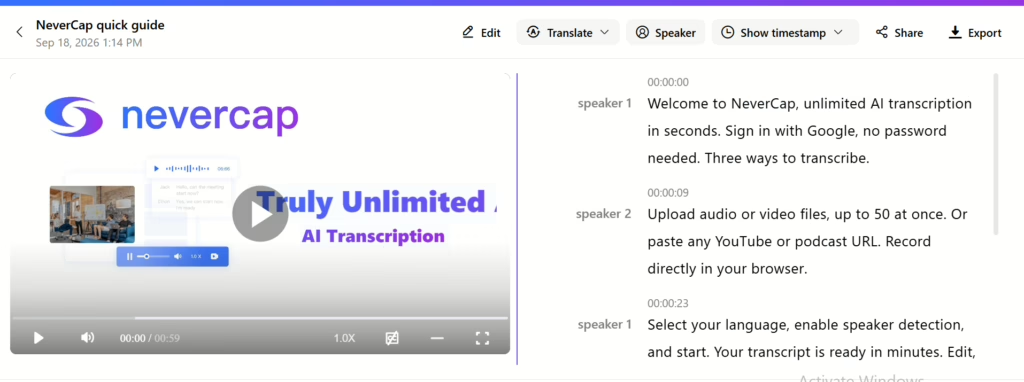
NeverCap can start either with a file upload or, for supported online video sources, a pasted URL. Its current upload interface supports common formats including MP3, MP4, M4A, MOV, AAC, WAV, OGG, OPUS, MPEG, WMA, WMV and FLAC.
Step 1: Add the source
Upload your audio or video recording. For supported video platforms, NeverCap also provides link-based transcription workflows.

Step 2: Choose the language and speaker option
Select the recording language and enable speaker identification when the recording contains multiple people.

Step 3: Run the transcription
NeverCap processes the recording and creates a text transcript. The company states that a one-hour recording typically processes in under five minutes, although we would expect actual processing time to depend on file size, queue load and recording complexity.
Step 4: Review speakers, timestamps and formatting
The output can include speaker labels, word-level timestamps, paragraphs and punctuation. These features are especially useful when you need to trace a statement back to a specific moment in the recording.
Step 5: Correct important passages
AI transcripts should still be reviewed when exact wording matters, particularly for quotations, research findings, legal content, medical terminology or material being published verbatim.
Step 6: Export the result
NeverCap currently supports formats including PDF, DOCX, Excel, CSV, SRT, TXT and VTT. That allows the same transcript to be used as a document, dataset, subtitle file or content-production source.

What Can You Actually Do With NeverCap?
Podcast workflow
Input: Recorded podcast episodes
Process: Upload episodes in batches → identify speakers → transcribe → review timestamps → export transcript
Outcome: Searchable episode transcripts, source material for show notes, captions and content repurposing.NeverCap specifically supports up to 50-file batches and markets this workflow for processing podcast back catalogs.
Interview and research workflow
Input: Research interviews or focus-group recordings
Process: Batch upload → speaker identification → word-level timestamps → transcript review → export
Outcome: Searchable qualitative data that can be reviewed, quoted and transferred into a research workflow.The product advertises speaker identification for up to 20 speakers, which is particularly relevant to interviews and focus groups.
YouTube and content creator workflow
Input: Existing video or supported video URL
Process: Upload or paste link → transcribe → edit → translate if needed → export SRT/VTT or document format
Outcome: Captions, transcripts, reusable written content and multilingual subtitle assets.NeverCap’s current creator workflow supports URL-based transcription for platforms including YouTube, TikTok, Vimeo and others.
Meeting archive workflow
Input: Recorded Zoom, Teams or other meeting audio/video
Process: Upload recording or record through the browser → transcribe → search/share → export
Outcome: A searchable record of conversations rather than recordings that nobody revisits.NeverCap’s business offering now also describes browser recording and searchable meeting archives.
Education workflow
Input: Lecture recording or educational video
Process: Upload or paste video link → transcribe → generate captions → review → export
Outcome: Searchable lecture notes, subtitles and source material for study resources.NeverCap explicitly positions these workflows for educators and recorded courses.
Who Should Use NeverCap?
NeverCap is ideal for anyone who needs bulk transcription or transcribes long recordings. Its main audiences include:
- Students & Academics: Lecture hall recordings, study group sessions, interviews for research, etc. NeverCap’s support for long lectures (3–10+ hours), transcript searchability, and no quota make study prep and research easier.
- Podcasters & Media Creators: Produce episodes faster by batch-transcribing them for show notes, subtitles, and social content. Unlimited uploads mean you’re never caught mid-season without transcription.
- Journalists & Researchers: Interview transcription (field recordings, focus groups) often involves many hours. Unlimited transcription and 20-speaker ID are great for multi-speaker interviews.
- Businesses & Teams: Convert meetings, training videos, webinars into minutes, searchable knowledge bases or subtitles. Multiple languages and secure handling make it enterprise-friendly.
- Content & Marketing Teams: Any team repurposing audio/video (YouTube, TikTok, webinars) can use transcripts for SEO and content strategy. NeverCap’s link-based transcriber (e.g. transcribe by pasting a YouTube URL) is very handy.
- Any Pro needing volume: If you ever hit a hard cap or had to buy extra minutes on other platforms, NeverCap’s pitch – “no more end-of-month anxiety” – resonates strongly.
In short, if your workflow involves lots of spoken content, NeverCap’s unlimited plan can save time and money. The main limitation is for very light users: the Free plan lets you try out the tool (3 files/day), and the paid plans make most sense when you need heavy usage.
Privacy and Data Retention: One Area We Would Clarify Before Sensitive Use
NeverCap makes several strong security claims on its website. Its FAQ currently states that the company is SOC 2 certified, uses 256-bit encryption, does not use customer content to train its models, and automatically purges files after 30 days.
However, its published Privacy Policy is less specific in some areas. The policy states that uploaded account content may be retained for as long as the account remains active unless the user deletes it. It also explicitly states that data is encrypted with SSL/TLS while being transmitted and that NeverCap does not sell user data.
Because the FAQ and Privacy Policy do not describe retention in exactly the same way, we would confirm the current retention policy directly with NeverCap before uploading highly sensitive legal, medical, confidential-source or regulated material.
For ordinary transcription projects this may not affect the purchasing decision, but for organizations with strict data-retention requirements, it is an important question to resolve before deployment.
Who Should Probably Look Elsewhere?
NeverCap would not be our first choice if your primary requirement is a full meeting-assistant ecosystem that automatically joins every video conference, or if you need an integrated professional video editor rather than a transcription-first workflow.
We would also be cautious about using any AI-only transcript without human verification when exact wording carries legal, medical, financial or publication risk.
Finally, someone who only transcribes a few short recordings each month may not benefit much from paying specifically for unlimited volume. In that case, the Free plan should be tested before upgrading.
Pros and Cons
| Pros | Cons |
|---|---|
| No monthly minute cap on Pro | 96% accuracy is a vendor-reported figure, not a guarantee for every recording |
| Up to 50 files per batch | Accuracy will still vary with noise, accents, overlap and specialist terminology |
| Individual files up to 10 hours / 5 GB | Privacy FAQ and formal Privacy Policy could communicate retention more consistently |
| 100+ transcription languages and 249+ translation languages | Unlimited volume is less valuable for very light users |
| Speaker identification for up to 20 speakers | AI transcripts still require human checking where exact wording matters |
| Word-level timestamps and multiple export formats | Product is transcription-first rather than a complete video-editing suite |
| Free plan requires no credit card |
Our Take on NeverCap
NeverCap’s strongest idea is surprisingly simple: stop making high-volume users think in minutes.
If your workflow involves a backlog of podcasts, interviews, recorded classes, research sessions or videos, the combination of unlimited monthly transcription and 50-file batch processing solves a real operational problem. Instead of deciding which recordings are worth spending credits on, you can process the whole archive.
We also like that the product supports long files. A 10-hour per-file ceiling is much more practical for conferences, workshops, long interviews and course recordings than products designed mainly around short meetings.
Where we would be more cautious is treating vendor accuracy percentages as guaranteed real-world performance. NeverCap publishes a 96% accuracy figure, but transcription accuracy will inevitably depend on the recording. Anyone buying the service for specialist terminology, poor-quality field audio or important quotations should test it with representative files before committing.
Privacy documentation is another area we would clarify for sensitive professional use because the product FAQ and formal Privacy Policy are not perfectly aligned on data retention.
Our view: NeverCap is most convincing as a high-volume, asynchronous transcription tool. Its value is less about having the longest feature list and more about letting users process large amounts of prerecorded content without repeatedly thinking about transcription quotas.
Final Verdict: Is NeverCap Worth It?
NeverCap is easiest to recommend to people whose transcription problem is volume.
Podcasters with back catalogs, researchers with dozens of interviews, educators processing recorded lectures and content teams working through video libraries can benefit most from the combination of long-file support, batch uploads and no monthly transcription-minute cap on Pro.
We would start with the Free plan and upload the type of recording you actually work with. Test speaker separation, difficult terminology, background noise and the amount of manual correction required. That tells you more than any advertised accuracy percentage.
If the output is good enough for your source material and you regularly process a large volume of recordings, NeverCap’s pricing model becomes its strongest advantage.
For occasional transcription, the unlimited model is much less important. And for sensitive or regulated recordings, we would clarify data-retention requirements before uploading production material.
Bottom line: NeverCap is a compelling option for high-volume prerecorded transcription, but the right buying decision should depend on how it performs on your own audio rather than the word “unlimited” alone.
FAQ
Q: What is NeverCap AI?
A: NeverCap is an online AI-powered transcription service. It converts audio and video into text with high accuracy (about 96% on clear recordings). It supports 100+ languages and has features like speaker labeling and timestamps. Unlike many tools, NeverCap offers unlimited transcription (no minute caps) on its Pro plans.
Q: Is NeverCap really unlimited?
A: Yes. NeverCap’s paid plans impose no monthly caps on transcription time. You can upload any number of files (batch up to 50 at once) and transcribe as much as you need. Other platforms may advertise unlimited but have hidden limits; NeverCap emphasizes that it means unlimited “when they say it”.
Q: Does NeverCap have a free plan?
A: Yes. The current Free plan costs $0, requires no credit card, allows up to three files per day, supports files up to 10 hours or 5 GB, and provides a 30-minute preview of each transcript.
Q: How accurate and fast is NeverCap?
A: NeverCap currently claims 96% accuracy for clear audio and says a one-hour recording typically processes in under five minutes. These are vendor-reported figures. Actual accuracy and processing time can vary depending on recording quality, speakers, file size and service load.
Q: What languages and file formats does NeverCap support?
A: It transcribes over 100 spoken languages (English, Spanish, Mandarin, Hindi, etc.) and can translate the transcripts into 249 languages. Supported input formats include MP3, MP4, WAV, AAC, MOV, OGG, WMA, FLAC, and more. You can also paste links from YouTube, TikTok, Dropbox, and similar platforms. Outputs can be saved as DOCX, PDF, SRT, VTT, TXT, CSV, and other formats.
Q: Is my data secure with NeverCap?
A: NeverCap states on its website that it uses security controls including encryption and says customer content is not used to train its models. Its Privacy Policy explicitly confirms SSL/TLS encryption in transit and states that user data is not sold. Because its FAQ and Privacy Policy describe retention somewhat differently, organizations handling sensitive material should review the current Privacy Policy and confirm their retention requirements with NeverCap directly.
Q: Are there any hidden fees or “fair use” policies?
A: NeverCap currently states that Pro has no monthly minute caps or transcription overage charges. Technical limits still apply, including a maximum of 10 hours or 5 GB per individual file and up to 50 files in a batch.
Q: Who should consider using NeverCap?
A: Anyone who transcribes a lot of content can benefit. It’s especially popular with students (lecture notes), podcasters, journalists, and business teams that handle meetings or interviews. If you’ve ever hit a transcription limit or bought extra minutes elsewhere, NeverCap’s unlimited model could be a better fit. Smaller users might stick to the free plan or even explore other tools, but for bulk users it’s a strong choice.
Q: Where can I learn more or try NeverCap?
A: Visit the official NeverCap website at NeverCap.ai. You can start using the service immediately (free signup) and explore their pricing page for full details. There are also demo videos and resources on their site showing how to upload and get transcripts. Always compare features and maybe read a few reviews, but NeverCap’s unlimited promise makes it worth a test run for heavy users.


Snehil Prakash is a growth leader in saas and it industry. He has lead multi million dollar businesses in this space and currently the CEO of Techlithic solutions LLC that owns brands like howtobuysaas, sendwo and work as venture partner for businesses to raise captial or going to the IPO way. Reachout to him to learn more.