Choosing a tool to send emails and text messages is a big choice for any store owner. You want a tool that can grow with you while keeping the learning curve low and power high. Most people look at Omnisend and Klaviyo due to their popularity, and they’re right to do so as both tools help you reach more customers and increase revenue.
A common misconception, though, is that a tool must be hard to use if it’s strong, and vice-versa. This is not, however, always true.
Omnisend, for example, stays powerful without being clunky or hard to understand. It works well for brands of any size, and it responds to every company’s needs that don’t require niche or hyper-specific capabilities.
Klaviyo, on the other hand, is a more technical tool that requires more expertise to utilize it fully, but that doesn’t mean it’s not fit for small businesses. You can do the same simple operations with Klaviyo and it won’t demand you to become a technical email marketing expert.
We’ll look at how these two tools compare in the ways that matter most to your business.
How to Add products to Email?
Adding items to your emails should be made as fast and convenient as possible since it’s likely one of the main things you’ll be doing. Copy-pasting links, texts, and pictures is not the most sustainable way in the long run. It’s a good thing both platforms allow you to do it quickly, albeit differently.
Omnisend has two blocks named Product Picker and Product Recommender. One is for static products that you pick yourself, the other one is for dynamically selected products based on rules.
With Product Picker, you drag-and-drop it into your email builder, and a sidebar appears on your right. In the sidebar, there’s an option to search your store (right from the sidebar) and pick your products. Once you’ve found what you want to add, you check the product(s), click “Add product”, and it automatically adds the product(s) to your email with the image, product name, description, price, and purchase link.
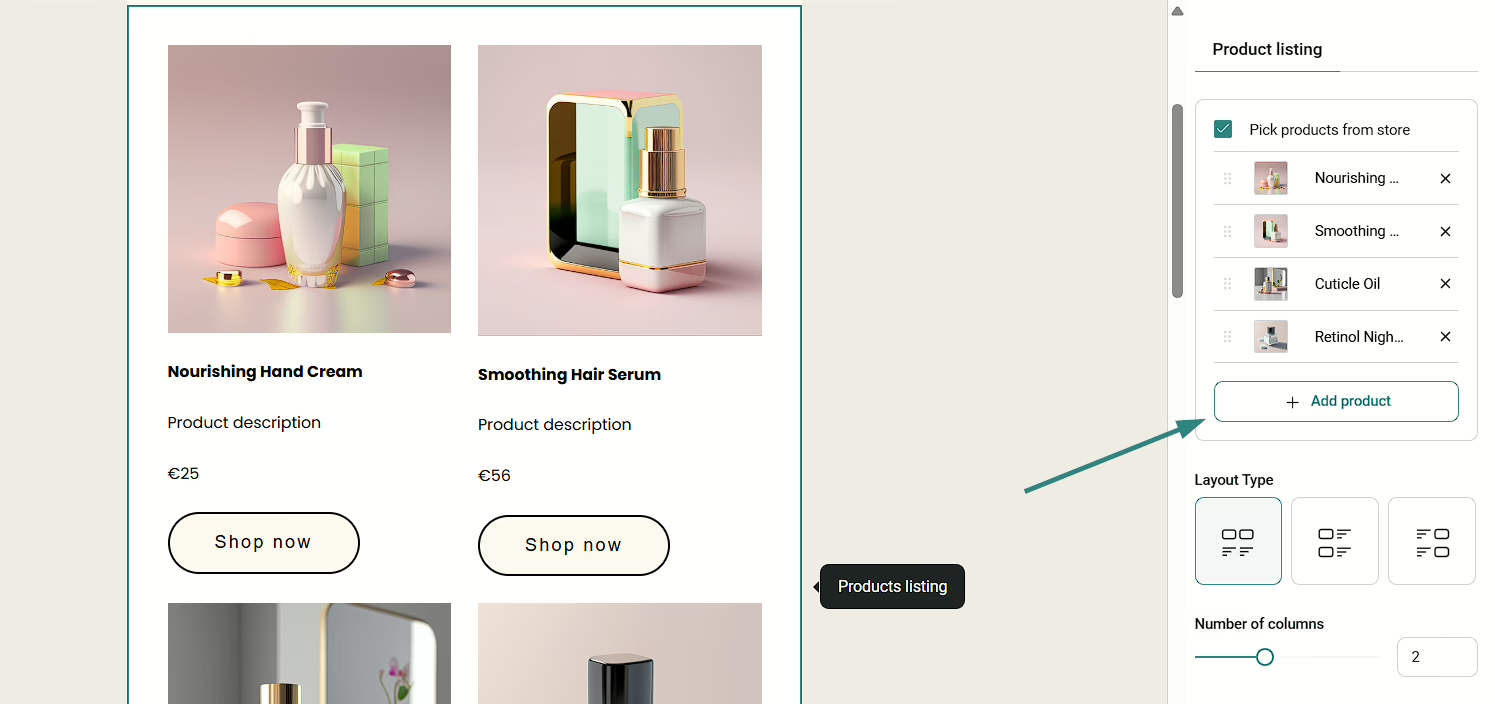
Image via Omnisend
Then, you can adjust the layout, edit the copy if you want to change something, change colors, and more.
If you want to go the other way, you can choose the Product Recommender block to have your products added automatically upon sending the campaign. You don’t need to do any complex setups or configurations for it; you just drag-and-drop the block into the email builder, and select which products you want to show. There are three choices: best-selling products, recently added products, and most viewed products. You won’t be able to see the products in your email editor, but once the campaign goes live, people will see the products in their inbox.
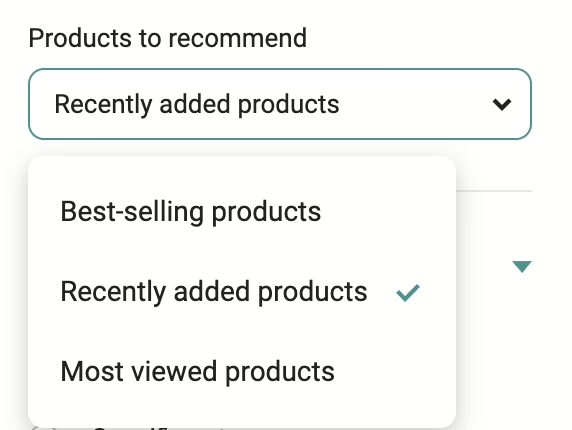
Image via Omnisend
Klaviyo has a slightly different interface for product-picking. Instead of having two separate blocks, they combine it in one with two different tabs.
The main difference is how you add the products. First, you need to set up a product feed where you choose a name for your product feed, select a catalog, choose conditions for priority logic, set fallback conditions, and select categories. It takes time to figure out how it works, which is rather excessive considering the results are practically the same as Omnisend’s.
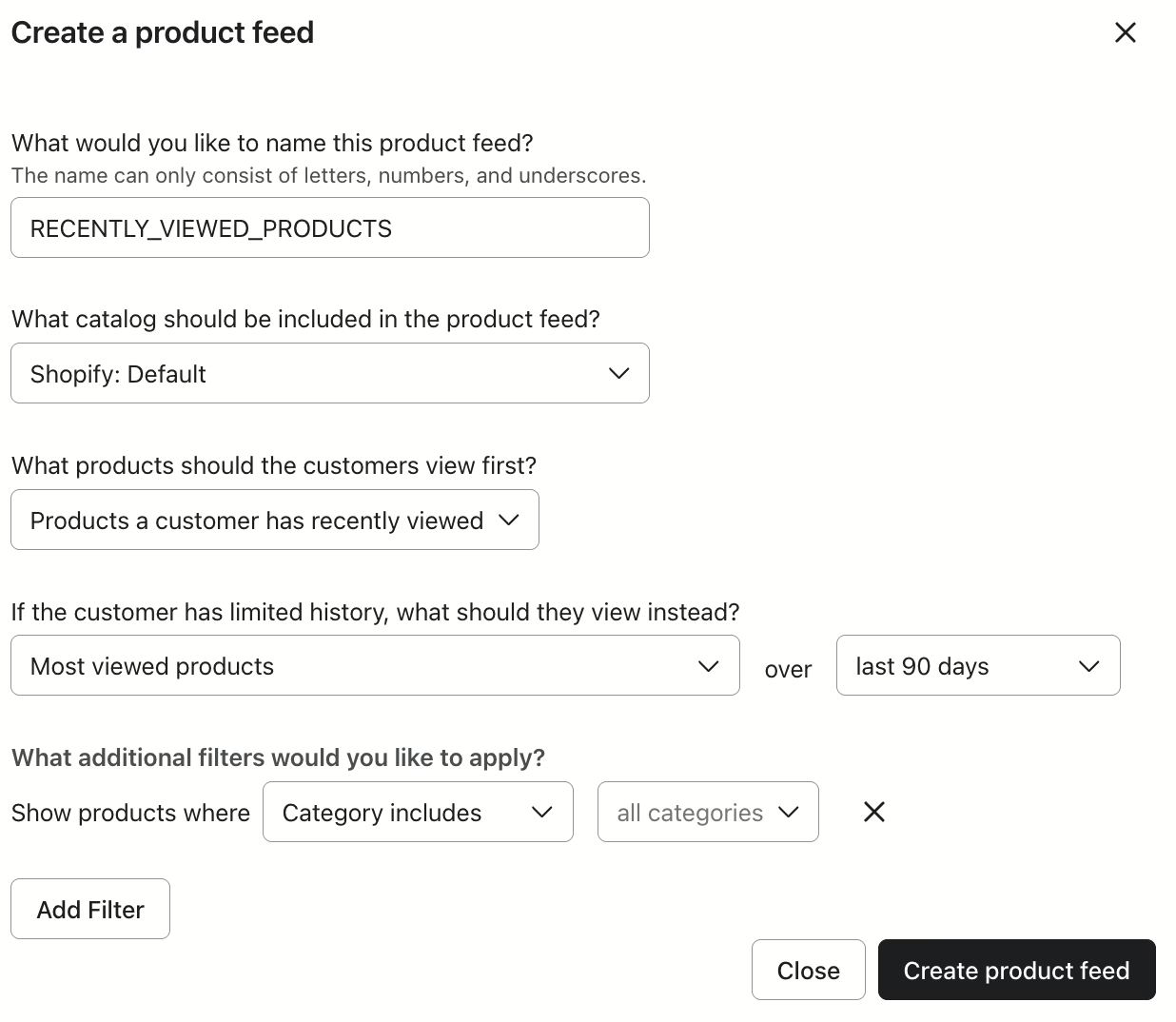
Image via Klaviyo
Klaviyo does, however, have more options for dynamically shown products. It also requires setting up a feed, but instead of having three options (Omnisend), you have eight (Klaviyo). Whether that’s better or not, it’s up to you. But sources say that more options usually result in analysis paralysis which results in either prolonged decision times or no decision at all.
They allow you to choose between best-selling products, most viewed products, both best-selling and most viewed, newest products, random products, products a customer has recently viewed, products a customer has added to cart, and products a customer may also like.
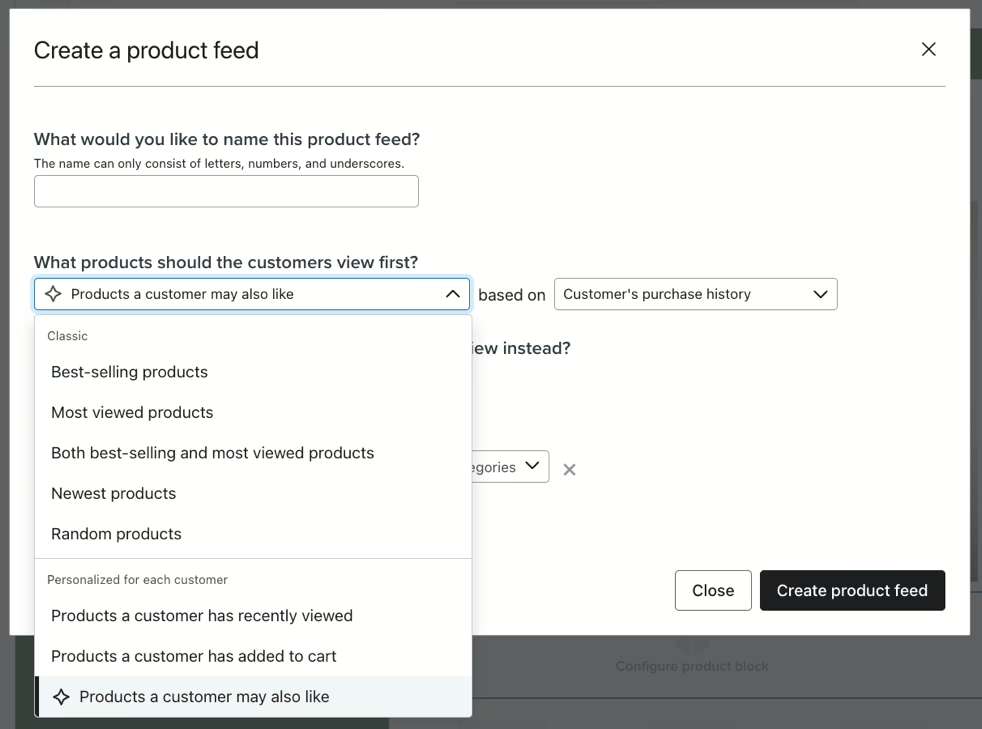
Image via Klaviyo
The AI-driven option seems interesting to try out, but keep in mind that AI is not yet at its best, and it may show your customer products that are completely irrelevant to what they actually like or buy.
To sum up, both Omnisend and Klaviyo allow you to add items to your campaigns, but Omnisend takes the more convenient path, whereas Klaviyo takes you through additional options that may seem overwhelming.
How does Automatic Resending work?
Most recipients don’t open every email they get in their inbox, especially if you caught them at the wrong time. Some emails are more important than others, so it’s important to have the option to occasionally automatically resend the campaign to non-openers.
Omnisend has a helpful tool called Campaign Booster, which you can find at the final steps of your email building process. To enable it, you only need to switch a toggle and choose the trigger (those who haven’t opened or those who haven’t clicked). If you want to, you can edit the subject line, as well. Once that’s done, the automatic resend will go off in 48 hours (you can customize this) after the initial email has been sent.
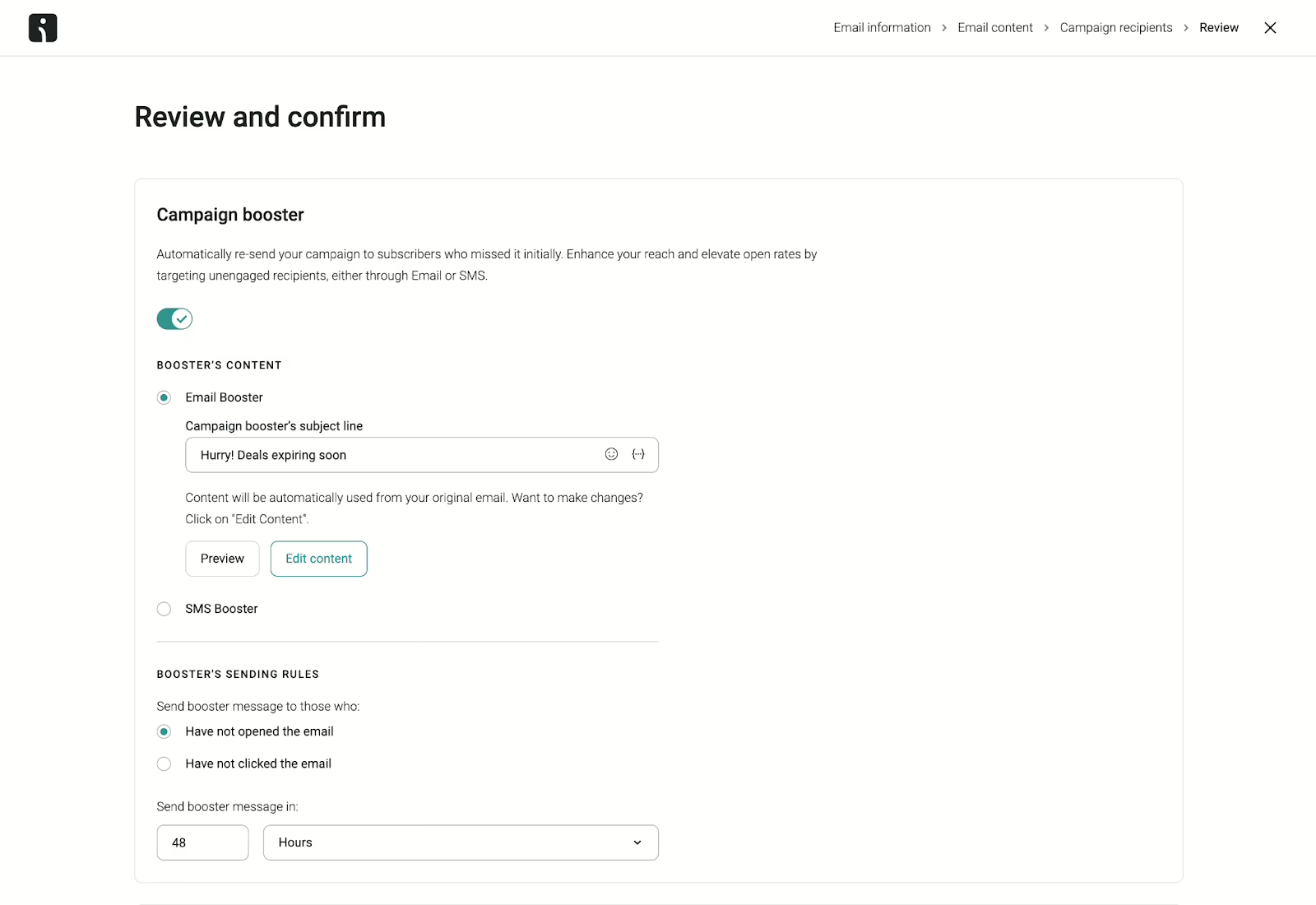
Image via Omnisend
Klaviyo also has a built-in feature that allows you to resend a campaign, but you cannot choose between non-openers or non-clickers; it only goes to non-openers. To set up the automatic resend, you need to enter a subject line, choose the non-openers you want to target, and set a time delay.
The targeting option is worth extra attention since it’s the main thing that adds additional complexity to Klaviyo’s automatic resending feature. You need to choose between profiles that engaged recently but didn’t open the first email, and the choice is between 30, 60, and 90 days of engagement. While it could be useful for experienced email marketers, it also introduces excessive friction for those seeking simplicity and efficiency.
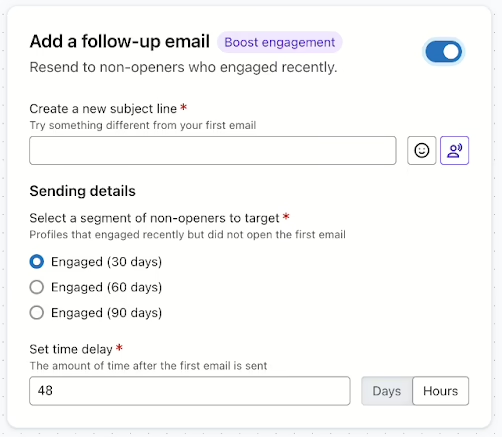
Image via Klaviyo
If you’re looking for a tool that does what you want it to do without overcomplicating the process, Omnisend is the better choice in this case.
Setting up automations
Automations are emails that are being sent continuously to customers based on their actions. For example, if someone has just subscribed to your newsletter, it’s smart to set up a “Welcome” sequence since they’ll be expecting to get something from you in their inbox. These automations are powerful not only for directly driving revenue but also improving retention.
Both Omnisend and Klaviyo are excellent at building automations, and both platforms have strong template libraries that you can use for quick launches. There is, however, one fundamental difference between the two tools.
Omnisend is best for roughly 95% of modern online businesses in terms of what their automations can do. You can build welcome sequences, abandoned cart workflows, follow-up automations, and even go deeper into more complex workflows based on specific customer behavior. There are different email triggers and audience filters you can use to create personalized flows. It has everything most businesses need.
Klaviyo is more focused on providing niche and highly complex capabilities to businesses who need it. The main thing is that not many businesses actually need it, and this power comes with a steep learning curve and financial cost. While you can also easily build simpler automations with Klaviyo just as you could with Omnisend, you may find that the pricing structure of Klaviyo is not ideal, and you should only choose Klaviyo if you need the niche power that you wouldn’t easily find anywhere else.
In short, Klaviyo is best if you’re a large enterprise with highly-specific personalization and automation needs that most other businesses simply don’t have. If you don’t need it, then Klaviyo is an overkill for your business, and Omnisend becomes a superior all-around choice.
Customer support availability
Using a new tool often comes with questions that can either be answered by reading lots of documentation, or asking a support agent.
Omnisend’s customer support is arguably one of the best in the industry. They provide 24/7 human support via live chat and email to everyone, free users included. It’s completely unrestricted and you can reach out to them anytime you need. Paid users do get priority support, but the response times are nearly as fast for free users, too.
Once you reach the point where your business has scaled enough to warrant a $400/month plan, they will provide you a dedicated account expert who will be there to help you with any issues you may have.
Also, Omnisend provides a unique migration service where they help businesses who want to switch from other platforms to Omnisend. If, upon signing up, your monthly plan exceeds $250/month, they will move your contacts, automations, segments, templates, and more, for free within 5 business days.
Klaviyo’s customer support is more limited and rigid. As a free user, you only get access to 60 days of email support (live chat not available), and once the 60 days are over, you’re cut off. Once you upgrade to a paid plan, the email support is renewed and you get access to 24/5 (weekends excluded) live chat support. The response times of email support vary greatly based on the plan you’re on, but the cheapest plan promises response times of 1-2 days.
For faster response times, you’d need to sign up for higher tiers which can go into the far end of hundreds of dollars per month.
Omnisend vs. Klaviyo: Verdict
Both tools are very strong and can help your store grow. Klaviyo is a good choice if you have a team of data scientists and the need for niche functionality, as it gives you highly detailed segmentation capabilities and very deep control over your data. However, it’s much more expensive than other tools as you get more customers. If you’re inexperienced, you might spend more time learning the tool than actually using it.
Omnisend is the best choice for the majority of online stores. It offers all the power of Klaviyo that most businesses need, but makes it easier to use. You save money on your monthly bill and get 24/7 support at the same time. It works perfectly for businesses of any size and doesn’t require you to dedicate hours learning the platform. Omnisend keeps your work simple and your power high.


Myself Snehil Prakash aka Chief Saasologist of Howtobuysaas. I am a saas marketer, who loves studying evolving software that is bringing change to the world. Share the same with people via howtobuysaas platform.